The electronic transport DeCA, now mandatory in Spain
JobDeca — in force since 5 October 2026. You can start issuing today.
JobDeca issues, publishes and stores the DeCA (Documento electrónico de Control Administrativo), Spain’s electronic transport control document, which Ley 9/2025 requires for every shipment carried by a haulier for hire or reward. Delivery notes arrive on their own from your management software —via API, file or email— or are entered by hand from day one. At the loading bay, the number plate is entered once per lorry; the driver takes the loading sheet with every QR code and the carrier receives them in a single email and on their phone.

Lorry 4821 KLM
3 DeCA issued ✓
Roadside inspection
QR verified
DeCA requirement
In force since 5 October 2026
Real screens · sample data
How JobDeca works
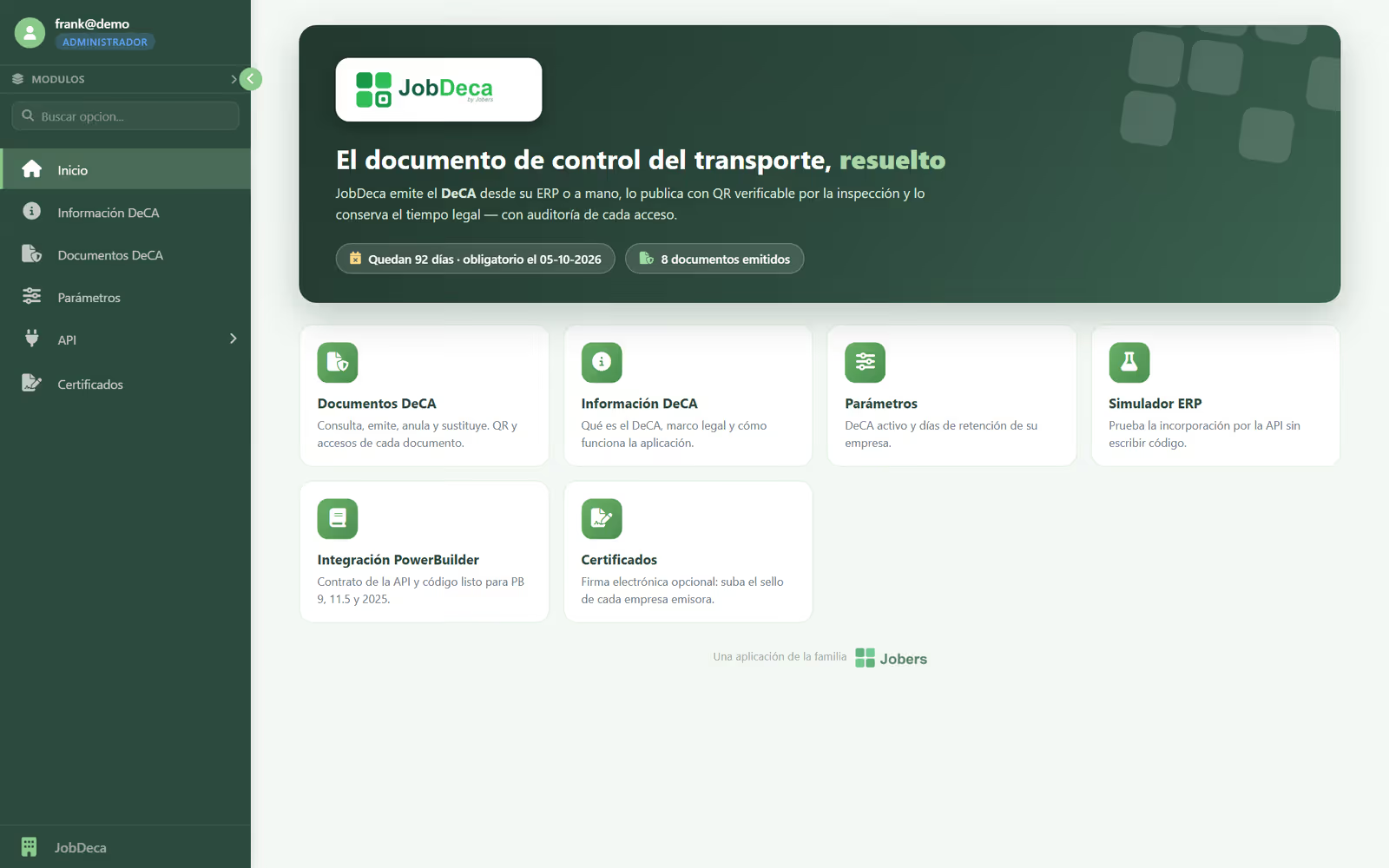
The home screen
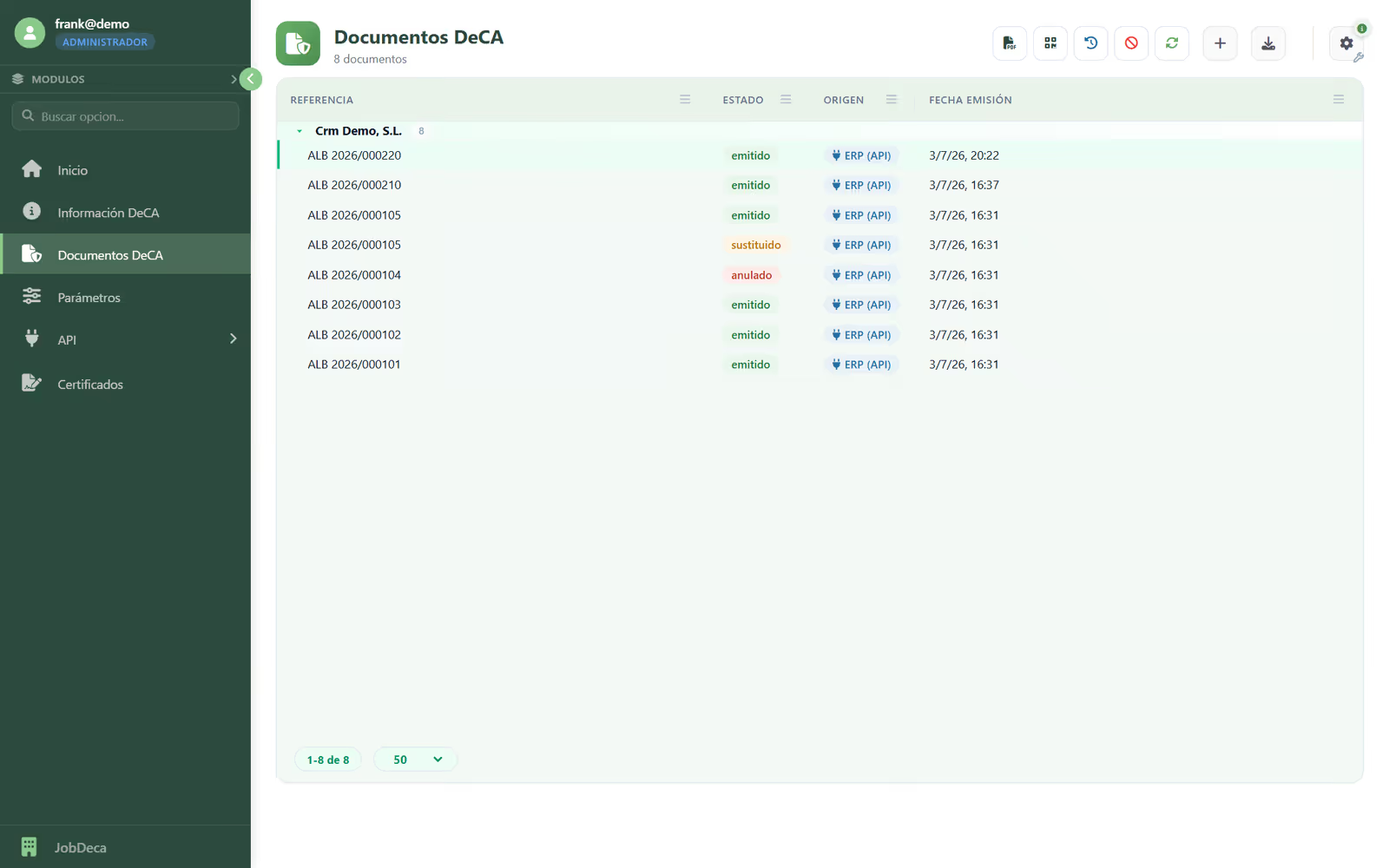
DeCA documents: how each one came in and its status
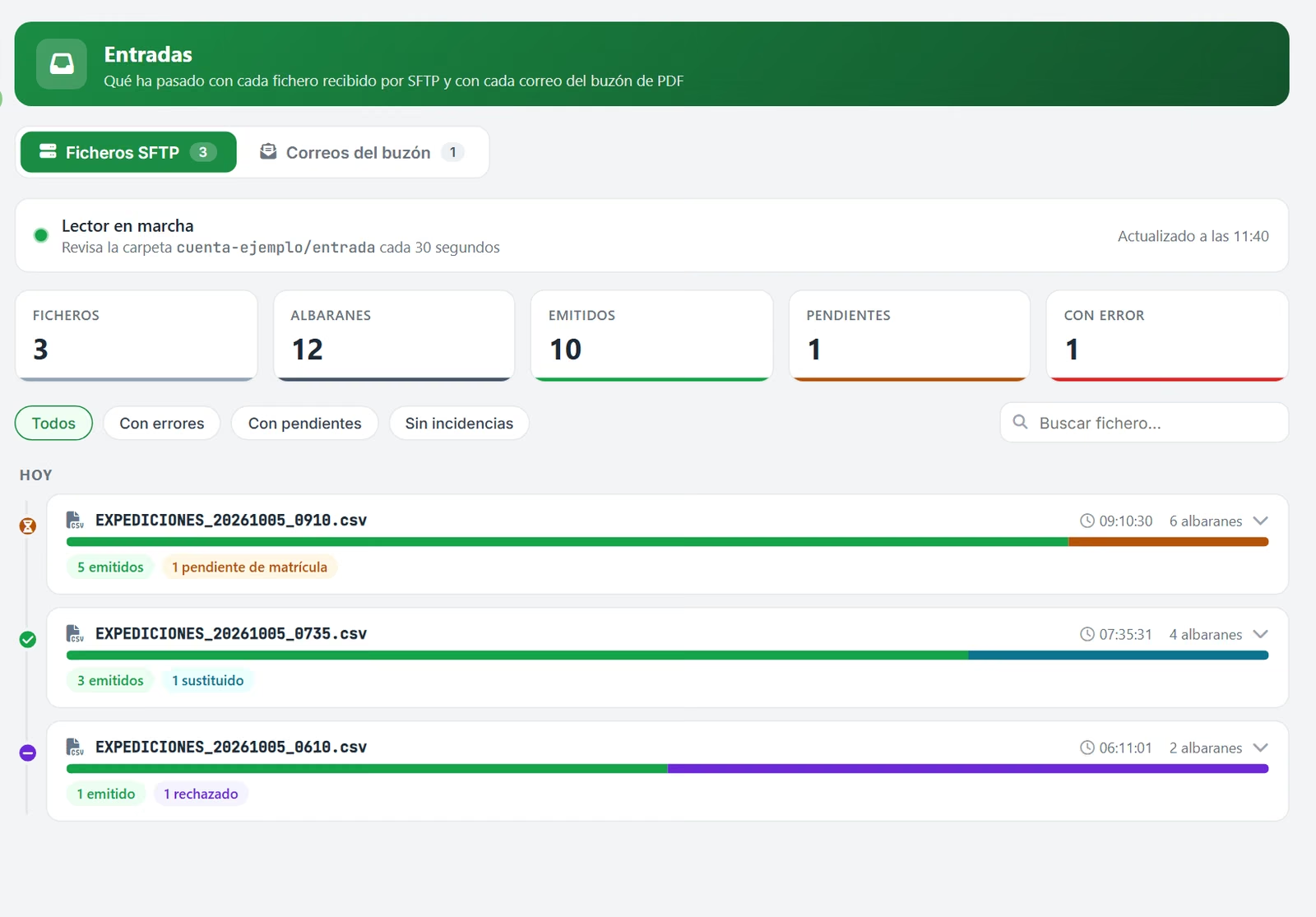
Inbound: what has arrived via SFTP and email
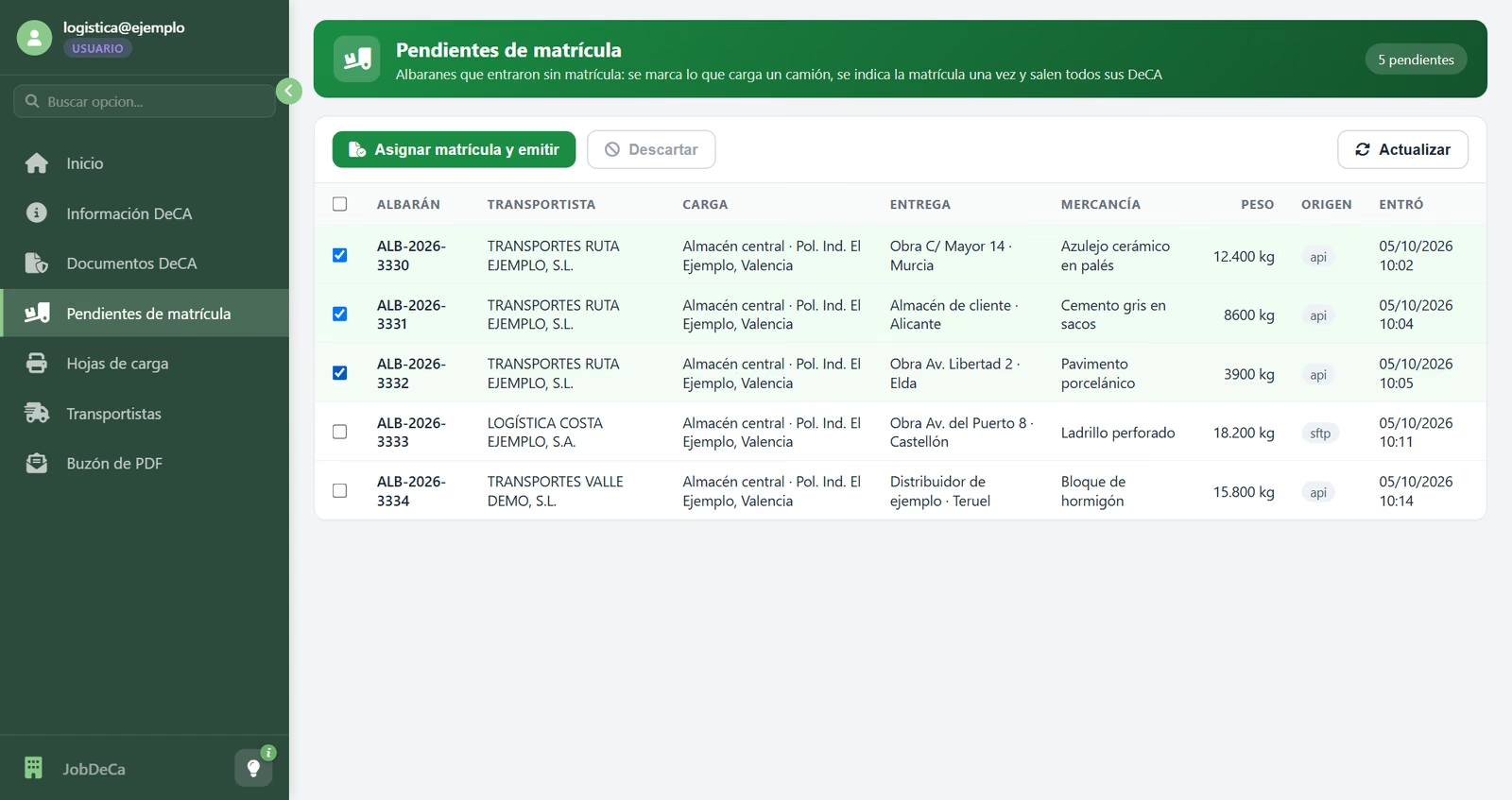
Awaiting number plate: tick the delivery notes on the lorry
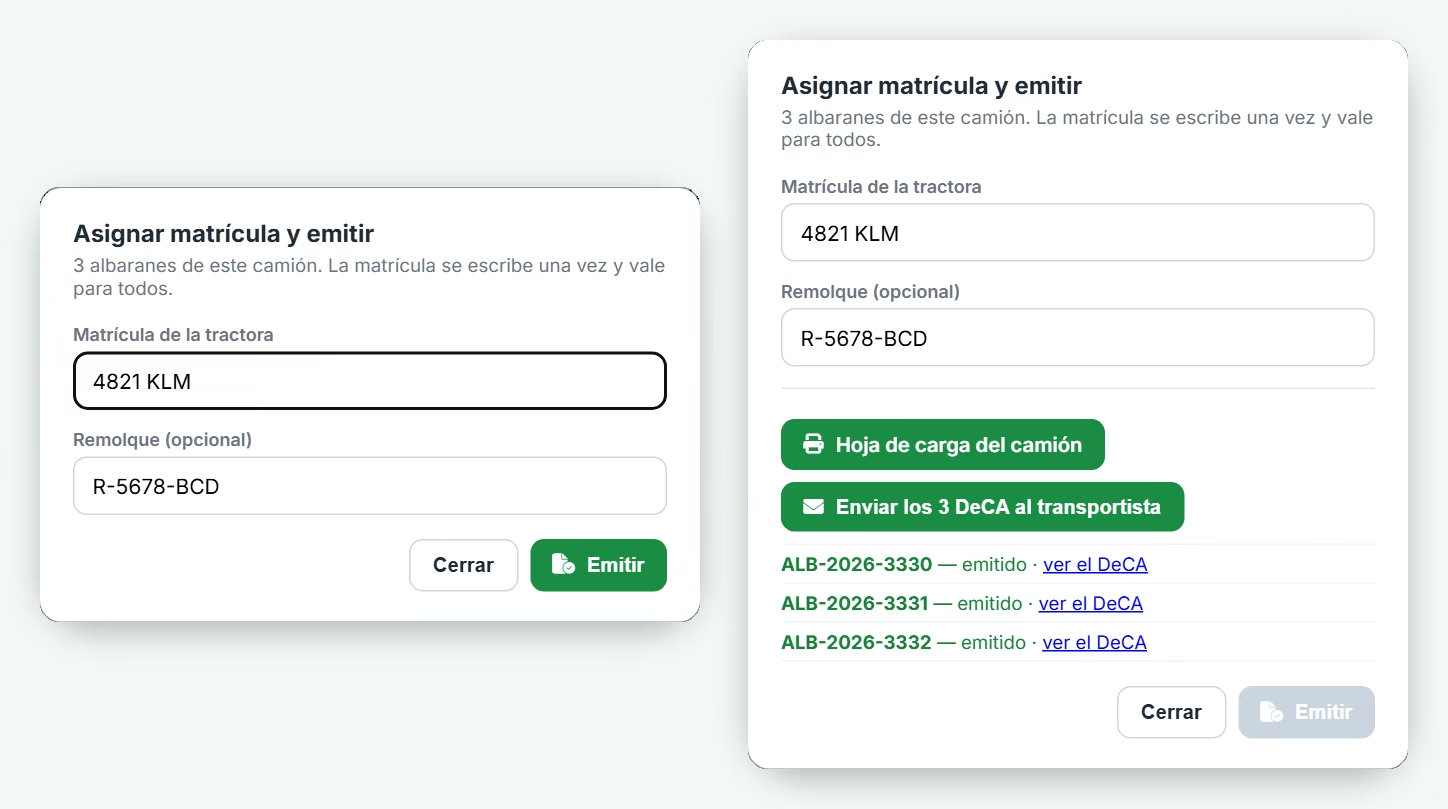
One registration for the whole truck, and all its DeCAs are issued
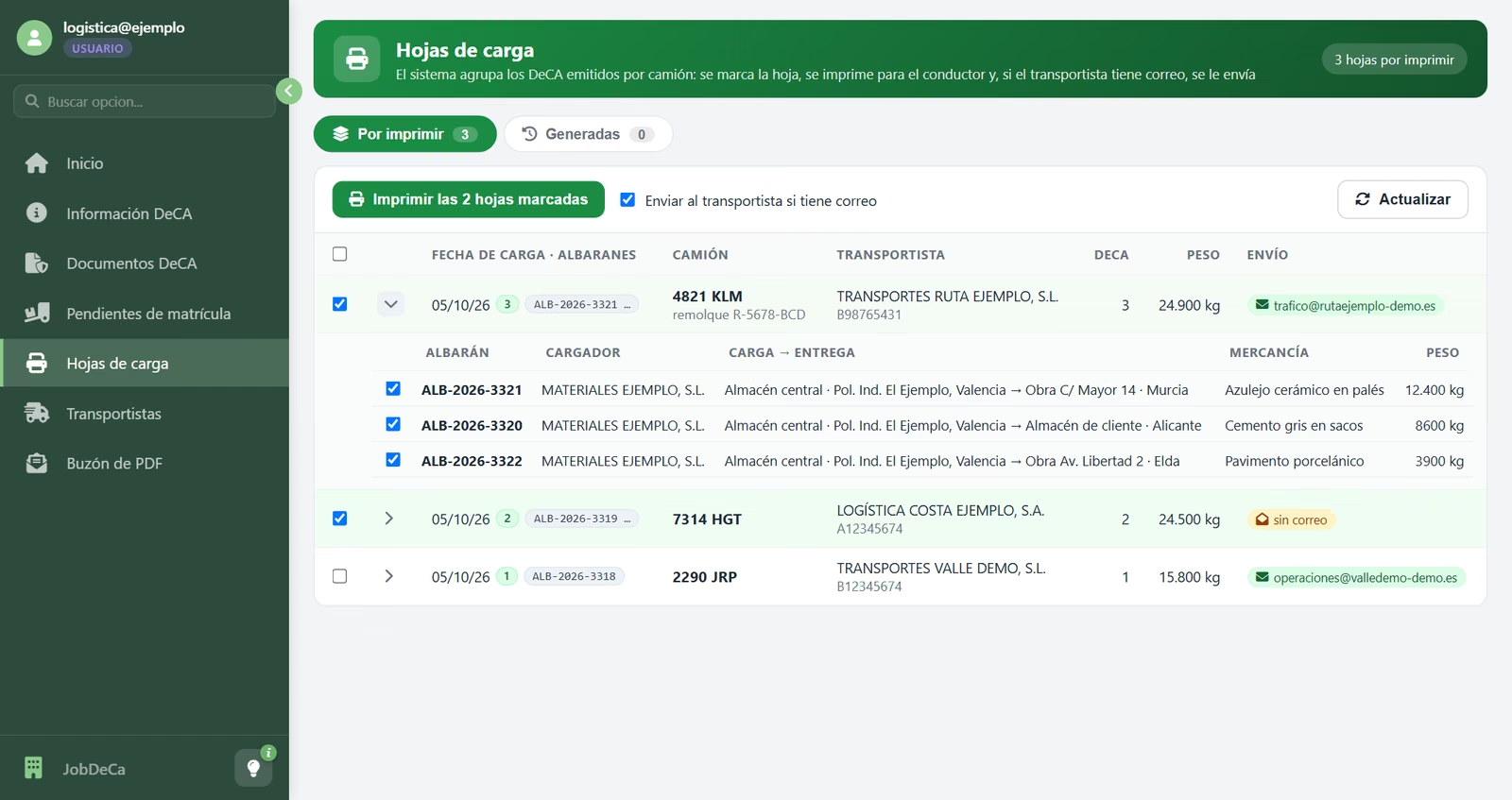
Loading sheets grouped by lorry
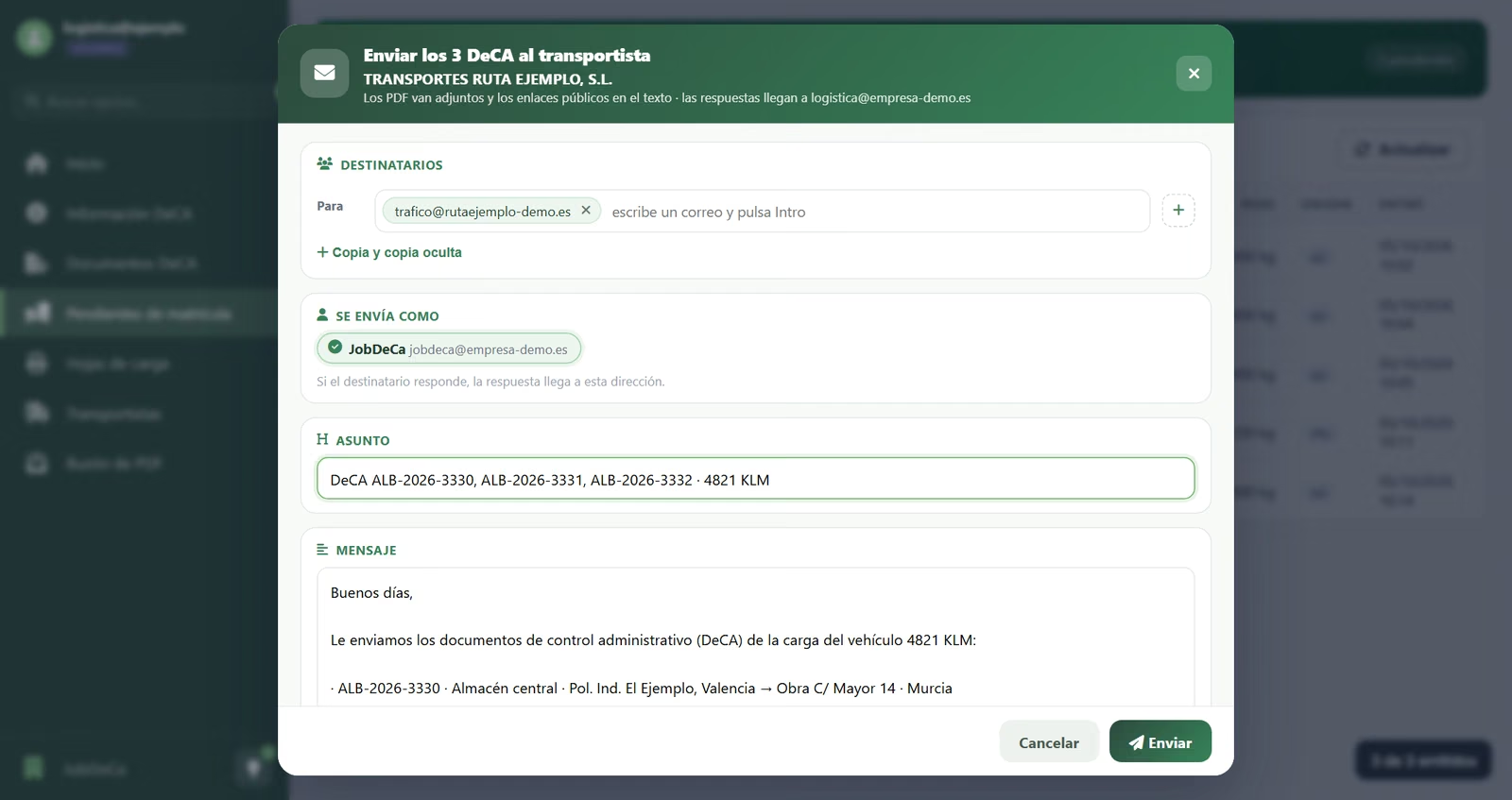
Every DeCA on the lorry, in a single email
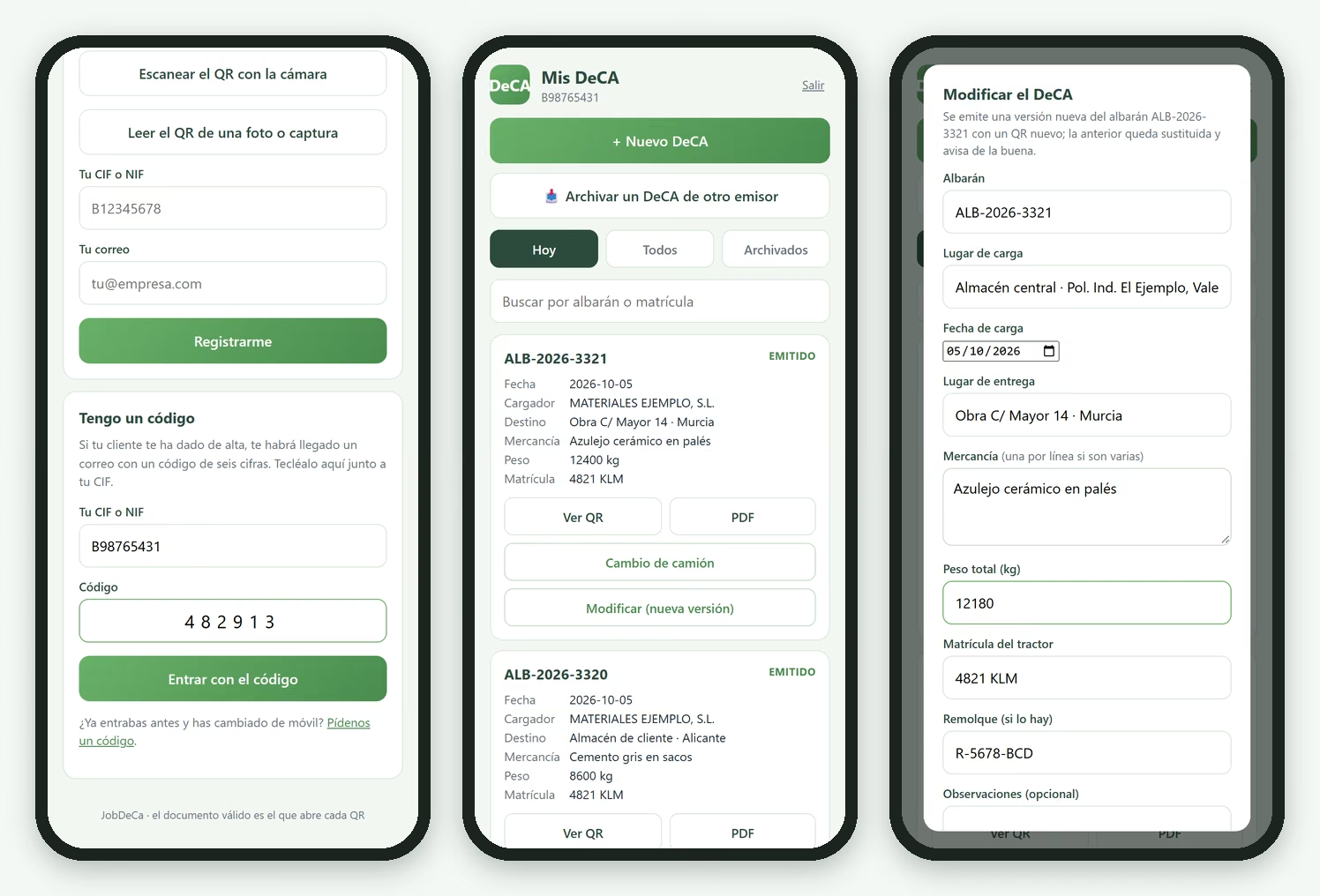
The carrier portal, on their phone
Four ways in
API, SFTP file, mailbox or manual entry: the same DeCA, whichever way it arrives.
Built for the loading bay
Type the number plate once per lorry and every DeCA on it is issued, with its loading sheet.
Native PDF + QR
Generated from the shipment data, with a QR code and a unique verifiable address, as the law requires.
Verifiable at the roadside
Inspectors scan and download the PDF instantly, with no username or password.
Carrier portal
Each carrier sees their DeCA on their phone and records a change of lorry en route.
Risk-free corrections
Replace or cancel, never edit: the old QR code warns and links to the current version.
History of every DeCA
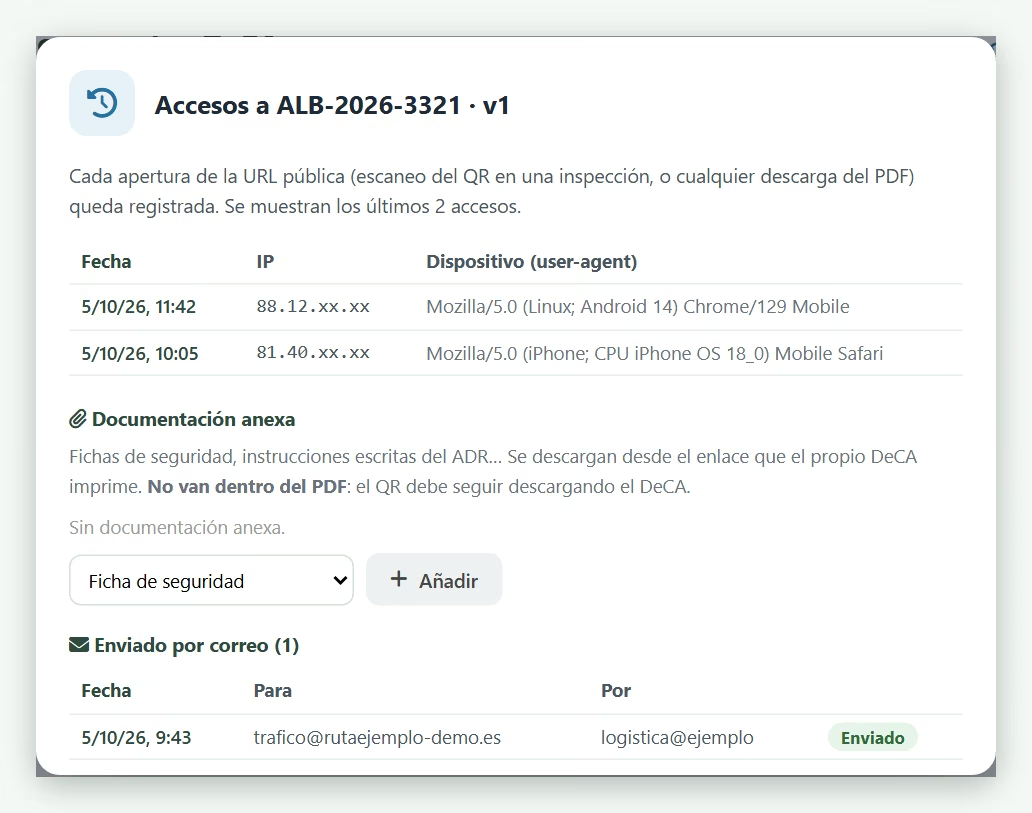
When it has been viewed (at a roadside inspection, for example) and who it has been sent to.
Legal retention
At least one year, with a daily backup on servers in the European Union.
Optional electronic signature
PAdES/eIDAS advanced signature per issuing company, with certificate expiry alerts.
Now mandatory
What the DeCA is and what you need from 5 October 2026
The DeCA (Documento electrónico de Control Administrativo) is Spain’s electronic transport control document. It identifies every road shipment carried for hire or reward: who contracts it (the contracting shipper), who carries it, what is being transported, how much it weighs, where it leaves from, where it is going and in which vehicle. Since 5 October 2026 it is mandatory and electronic (Ley 9/2025): a native PDF with a QR code that inspectors open at the roadside with no username or password, and which is kept for at least one year.
JobDeca is Jobers’ answer, and it was up and running before the deadline. It turns every delivery note into its DeCA —whether it comes from your management software or is typed in by hand—, organises the loading bay by lorry, gets the document to the carrier and keeps it for the legal period. If a detail is wrong, the document is not edited: it is replaced by a new version and the old QR code says so. The regulatory detail is in our guide “The DeCA is now mandatory”.
How delivery notes arrive
Four ways for the delivery note to arrive, and the same DeCA
Choose the one that best fits your software. A problem with one delivery note does not stop the rest: if 50 arrive and one is wrong, 49 are issued and you get an alert explaining why.
The most direct
API from your management software
When the delivery note is saved, your software calls JobDeca and instantly receives the DeCA address and its identifier. Any program that can make an HTTPS request will do.
In batches
File via SFTP
Your system drops a file with the delivery notes into a secure folder. JobDeca picks it up every few seconds and leaves a response file with the result of each line.
Without touching your software
Mailbox
Forward the delivery note as a PDF to an email address; JobDeca reads it, issues the DeCA and replies with the PDF and its QR code. It only accepts authorised senders.
From day one
Manual entry
From the screen, one at a time, on the computer or on your phone. The same DeCA, with the same validity: start today while your software is being integrated.
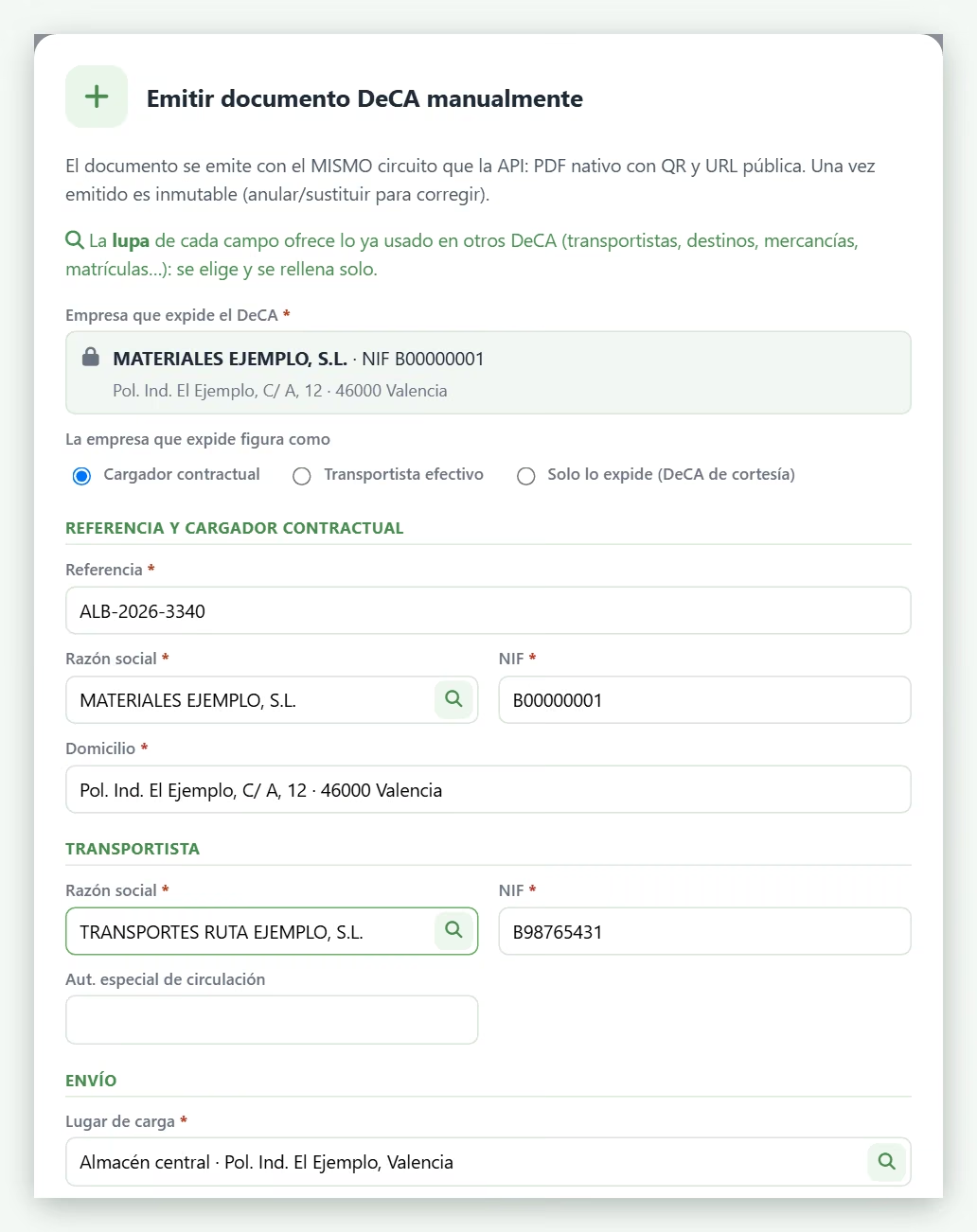
Manual entry, to start today
The issuing company is preset and fixed; the shipper fills itself in; the carrier, the places and the goods are chosen with a search box that remembers what you have used before. The DeCA is issued instantly with its PDF and QR code.
- ✔ You appear as the contracting shipper, the actual carrier or simply as the issuer (courtesy DeCA).
- ✔ If that delivery note later arrives through the integration, it replaces the one entered by hand: there are never two.
- ✔ Also on your phone, with nothing to install.
The circuit
From delivery note to driver, in six steps
Your team only steps in at the loading bay; everything else is automatic.
- 1 Automatic
The delivery note arrives
From your management software: via the API, a file or email. Or it is entered by hand.
- 2 Automatic
JobDeca converts it
With a number plate, the DeCA is issued instantly. Without one, it waits in “Awaiting number plate”.
- 3 At the loading bay
Number plate to the lorry
Tick the delivery notes it is carrying and type the number plate once: every DeCA on it is issued.
- 4 At the loading bay
Loading sheet
One PDF with every QR code on the lorry: the driver’s copy, on a single sheet of paper.
- 5 At the loading bay
Sent to the carrier
Every DeCA on the lorry, with the sheet, in a single email. Their address is saved.
- 6 On the road
The officer scans
The QR code opens the DeCA instantly, with no username or password. The lookup is logged.
At the loading bay
The number plate, the loading sheet and the email to the carrier
One number plate, every DeCA on the lorry
Normally the delivery note leaves your software without a number plate: it waits in Awaiting number plate. At the loading bay you tick the ones that lorry is carrying, type the number plate of the tractor unit (and trailer) once, and they are all issued. The window shows, note by note, what has been issued; if one fails, the rest go through anyway. There is no vehicle file to maintain.
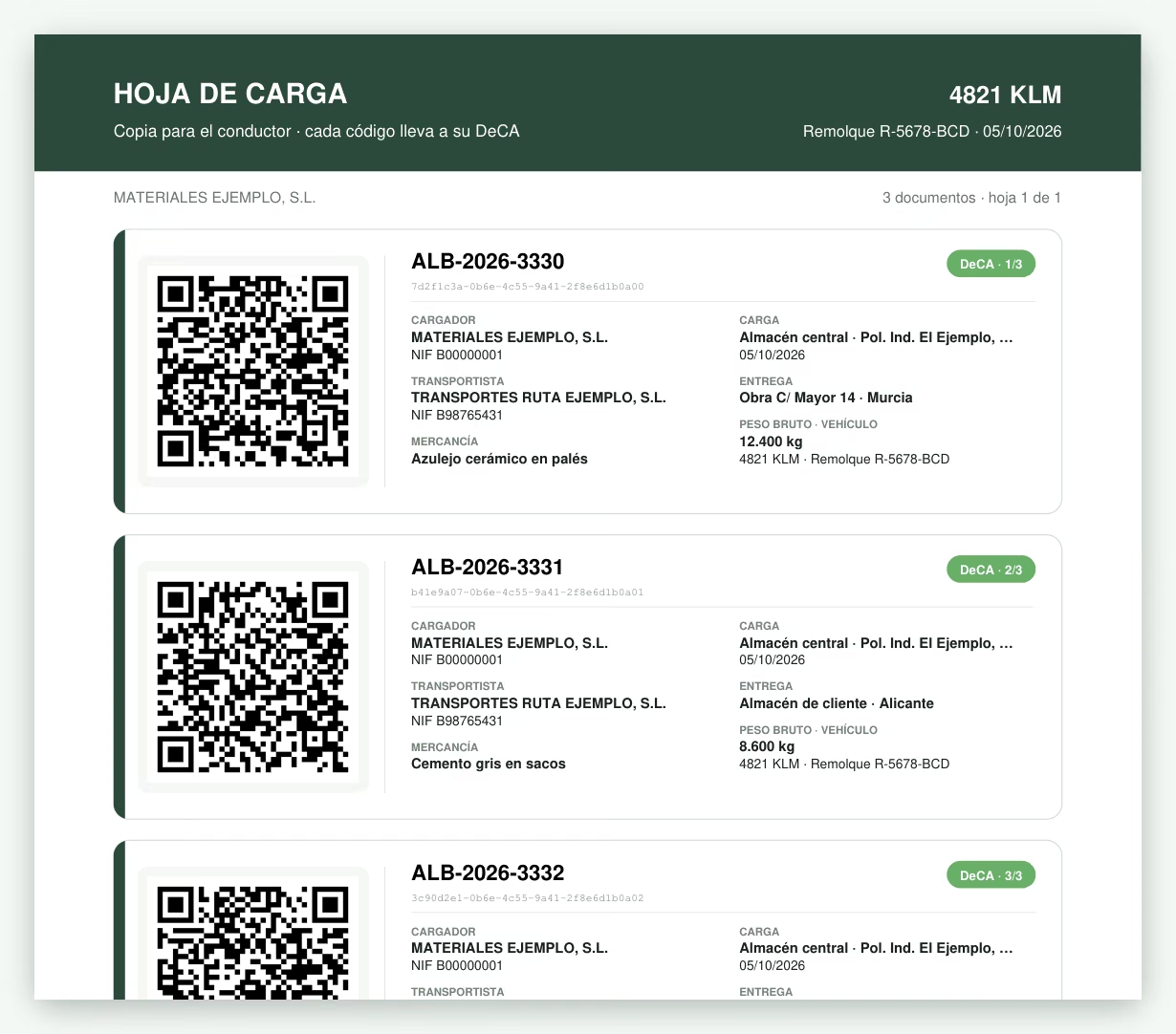
The loading sheet: the driver’s copy
One PDF with every DeCA on the lorry, each with its QR code and a mini summary —shipper, carrier, loading, delivery, goods, weight and vehicle— and its position (1/3, 2/3…). So the driver does not have to hunt through fifteen documents on their phone. For lorries with many drops there is a QR-only format, six per page.
If the DeCA were entered by hand, the Loading sheets screen groups them automatically by lorry, carrier and day: tick, print and send.
To the carrier, in a single email
One click sends them every PDF, the loading sheet and the link to each DeCA. If we already have their email it is prefilled; if not, whatever you type is saved for next time. If they reply, the reply goes to whoever sent it.
The carrier
Their DeCA on their phone, without asking you for passwords
📲 Log in with an invitation or the QR code
They receive an email with a link and a six-digit code, or they register by scanning the QR code of one of their DeCA. From then on they log in with their phone’s fingerprint or face, and can install it like any other app.
📄 They only see their own
The DeCA in which they appear as the carrier, and only your company’s: delivery note, destination, goods, weight, number plate, the full-screen QR code and the PDF.
🔧 Corrections en route
If you allow it, they correct the weighbridge weight or the number plate by issuing a new version, without calling the office.
🔄 Change of lorry
If the lorry changes once the journey has started, they record it: the DeCA keeps its QR code and the change is printed on the document, as art. 6.g of the Orden requires.
You decide what they can do from their phone, and you revoke access with one click.
Risk-free corrections
A wrong detail? It is replaced, and the old QR code says so
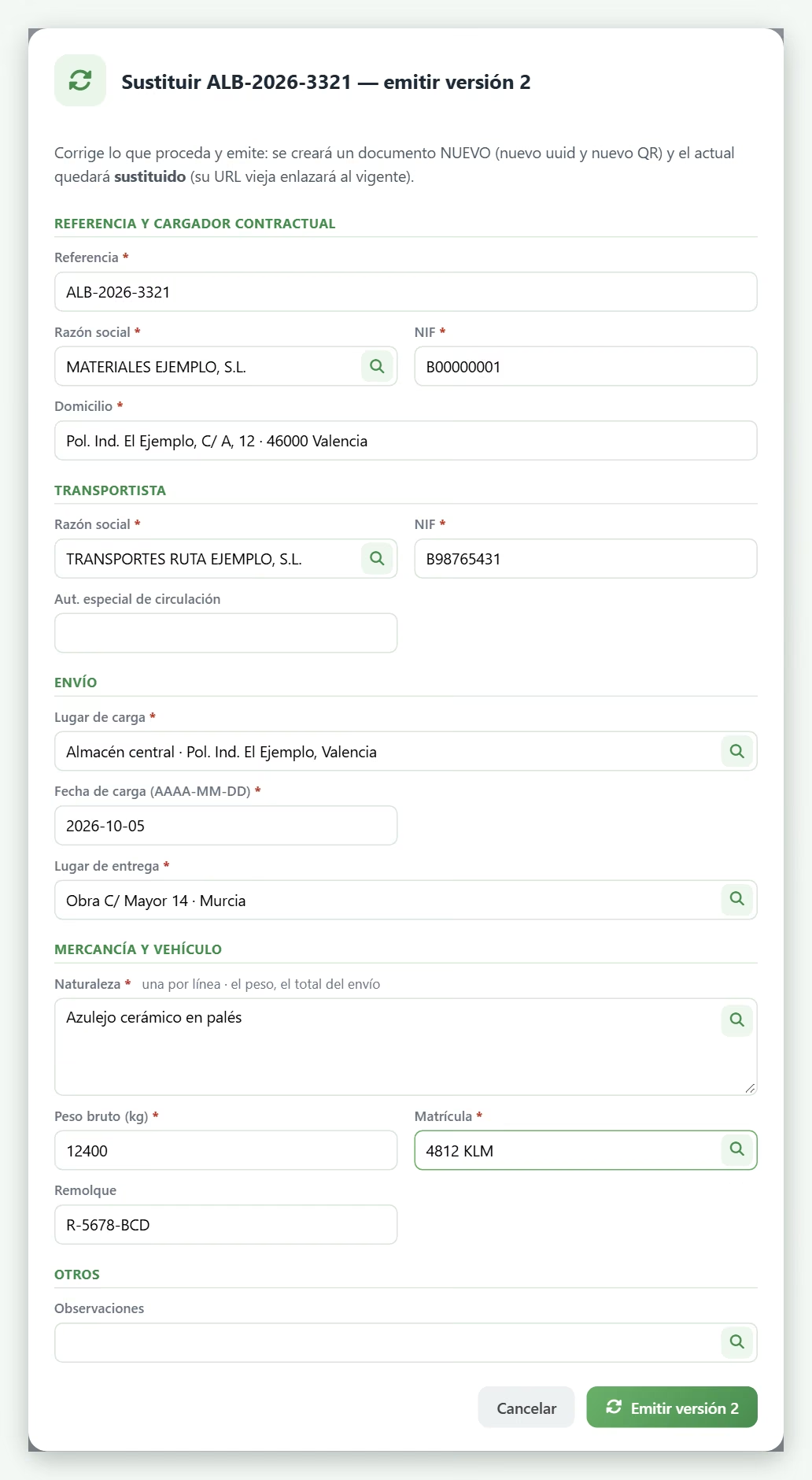
Replace. Open the DeCA, correct whatever is needed (the number plate, the weight, the destination) and issue version 2, with its own QR code.
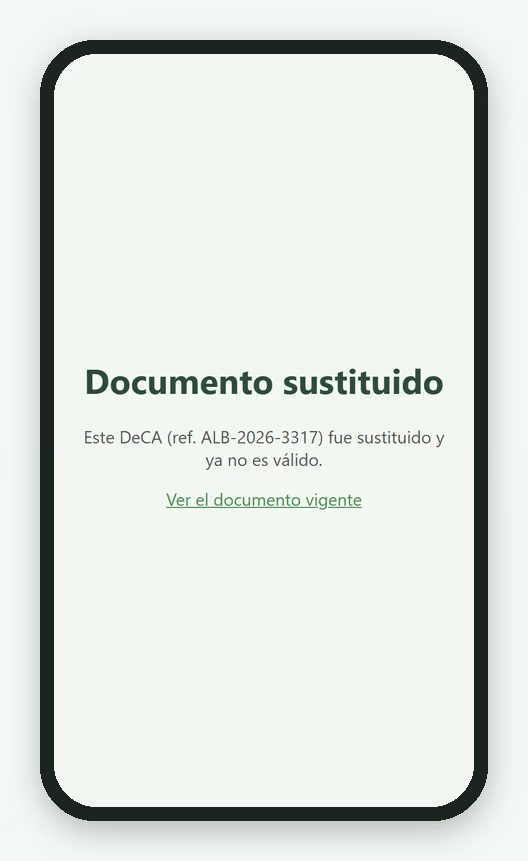
The old QR code warns. Whoever scans it will see that the document has been replaced, with a link to the current one. Inspectors never hit a dead end.
Cancel. If the transport does not go ahead, the DeCA is cancelled: it is not deleted, and its address says so.
History. Every DeCA records when it has been viewed —at a roadside inspection, for example— and who it has been sent to.
On the road
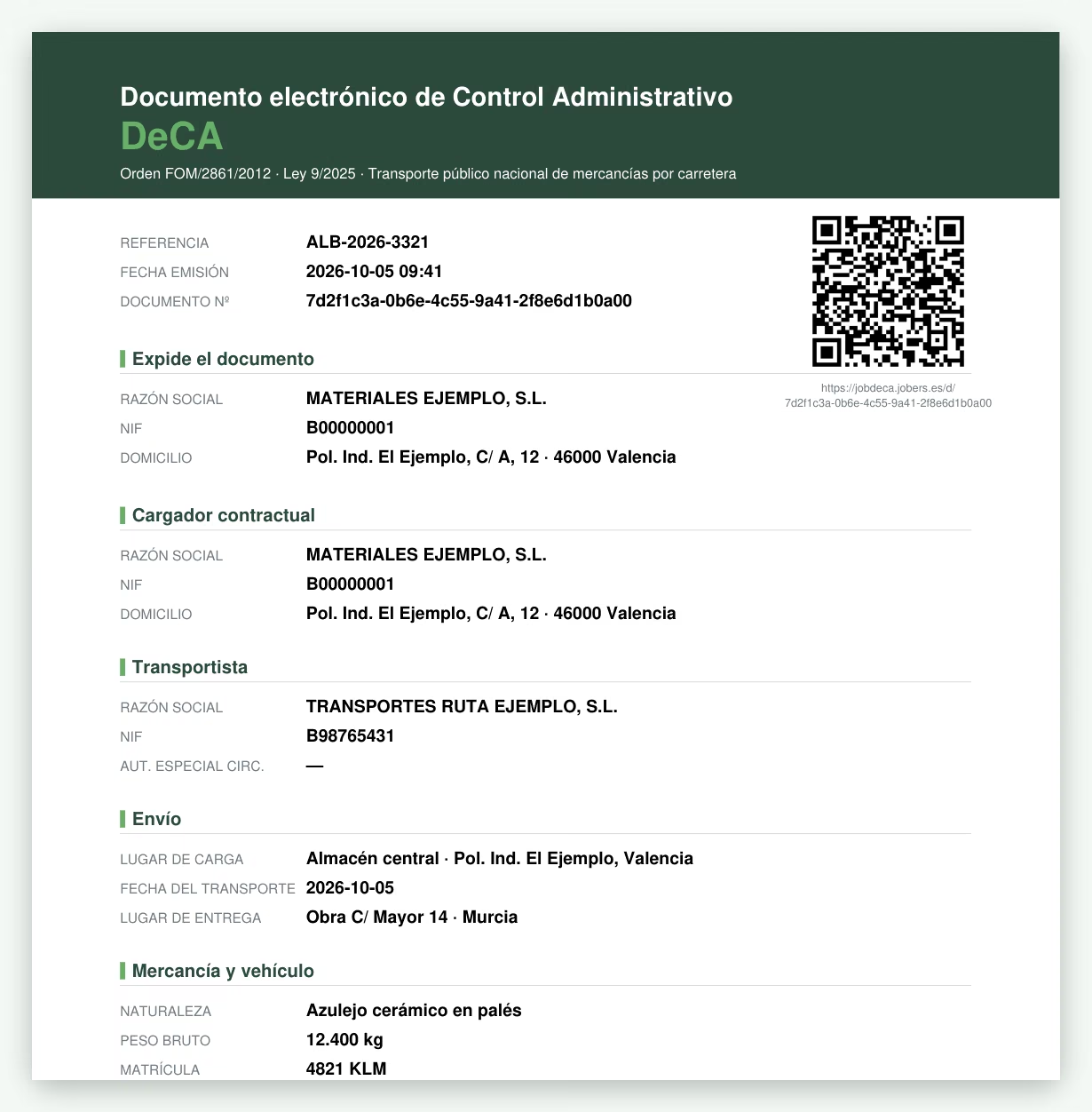
What the officer sees when scanning the QR code
The DeCA as a PDF, instantly and with no username or password, on paper or on the driver’s phone screen. It carries the data required by art. 6 of Orden FOM/2861/2012 —shipper, carrier, place and date of loading, delivery, goods, weight and vehicle— and, at the foot, the legal note reminding that handwritten annotations on the paper are not valid.
- Natively generated digital PDF, never scanned.
- Every lookup is logged: it is proof that the document was available.
- Kept for at least one year on servers in the European Union, with a daily backup.
- Optional advanced electronic signature with each company’s seal certificate.
For the whole team
In three languages and on your phone
On the computer, tablet or phone
Nothing to install: the loading bay works on the tablet, the office on the computer and the carrier on their phone.
Manuals in Spanish, English and French
For groups with teams in other countries: the operations manual and the full manual come in all three languages.
Help in your language
The light bulb in the menu sends us questions, faults or ideas instantly, with the screen attached, in the language of whoever writes.
Use cases
Who JobDeca is for
Building materials distributors
They sell and contract haulage from carriers: they are the contracting shipper and must have the DeCA for every shipment and keep it.
Manufacturers and ceramics producers
Daily dispatches with agencies and carriers: one DeCA per delivery note, issued automatically from the management software.
Companies with a mixed fleet
Delivery with your own means (not required) and contracted haulage (required) live side by side: each delivery note decides.
Collections from suppliers
If you go to collect material with a carrier you contract yourselves, you are the shipper: manual entry in two minutes.
Company groups
Several issuing companies in a single account; each user can only see and issue those of their own.
Courtesy DeCA
When your customer contracts the transport, you can issue the document for them as a service: they appear as the shipper.
Regulation
The three rules you need to know
- Orden FOM/2861/2012 — defines the minimum content of the document and the unit: one document per shipment (if a lorry carries three delivery notes for three customers, that is three DeCA).
- Ley 9/2025 — makes it electronic and mandatory from 5 October 2026 for domestic transport within Spain, with a minimum retention of one year. Own-account transport (goods, vehicle and driver all belonging to the company, all three) is not required to have one.
- Resolución de 5 de junio de 2026 — technical requirements: natively generated PDF (max. 5 MB), QR code with a unique, secure address, and download without authentication for inspectors.
JobDeca meets all three as standard, and gets on especially well with the rest of the suite: delivery notes are born in the ERP, delivery with your own vehicles is organised with JobRutas, and haulage with a carrier goes out with its DeCA issued automatically.
Frequently asked questions
What people ask us most about the DeCA and JobDeca
Since when has the DeCA been mandatory?
If we deliver with our own lorries, do we need a DeCA?
We do not have it yet. Can we start today?
How do delivery notes reach JobDeca?
A lorry carries several delivery notes: one DeCA or several?
What happens if a detail is wrong, the number plate for example?
What does the carrier see?
What do inspectors see when they scan the QR code?
Does it meet the technical requirements of the regulation?
Do I need the Jobers ERP to use JobDeca?
Not issuing the DeCA yet? You can start today
We set you up and you issue by hand from day one while we integrate your management software. We will show you with your own delivery notes.