


JobCeram
Ceramics distribution
Shades, calibres, sizes and pallets: ceramics, all in order.
For manufacturers, distributors and warehouses of ceramic floor and wall tiles: every item with its series, size, quality, shade and calibre; every pallet in its location; and purchasing, from order to invoice, on the web.
Real JobCeram screen, with fictitious data from a demo company.
Who it’s for
Designed for people who make a living from ceramics
Thousands of references sold by shade and calibre, sizes that are each palletised in their own way, and a warehouse where every pallet has to be exactly where the system says it is.
Manufacturers
Floor and wall tiles with their series, sizes, qualities and finishes, and stock by shade and calibre ready to ship.
Distributors and exporters
Catalogues from several manufacturers, purchase orders with their goods receipt, and pallets heading off to many destinations.
Ceramic warehouses
Locations by warehouse, zone, row and level, labelled numbered pallets, and stock counts without stopping the warehouse.
What it does
Ceramics, with the logic of the factory
Shade, calibre, size and pallet aren’t loose fields: they’re how the industry works, and JobCeram has them at its core.
Ceramic item record
Series, size, quality, colour, finish, use, body and brand; with its qualities, its customer-specific details and its history, all in one record.
Shade and calibre
The item is controlled by shade and stock can be checked down to shade, calibre and pallet: what the customer orders is what ships.
Sizes and packing
Each item with its pieces and m² per box, its weight and what each type of pallet holds: boxes, pieces, m² and kilos.
Location map
Warehouses, zones, rows and levels; free locations and stock by location, so you know where everything is.
Goods in, goods out and transfers
Every stock movement goes through a single piece, so stock, locations and history always add up.
Numbered pallets
Pallets with their SSCC label and control by location range to transfer, take out whole, ship partially and repalletise.
End-to-end purchasing
Purchase order, delivery note, goods receipt and putaway, purchase invoice with the final cost, plus enquiries and statistics.
Purchase planning
Minimums and maximums per item and dynamic stock control that suggests what to order based on what sells.
With JobFinan
Suppliers, payment methods and accounting shared with JobFinan, the finance side of the family.
Real screens
How you work with JobCeram
Screenshots of JobCeram with a demo company. The data (series, items, suppliers, codes and amounts) is fictitious.
01
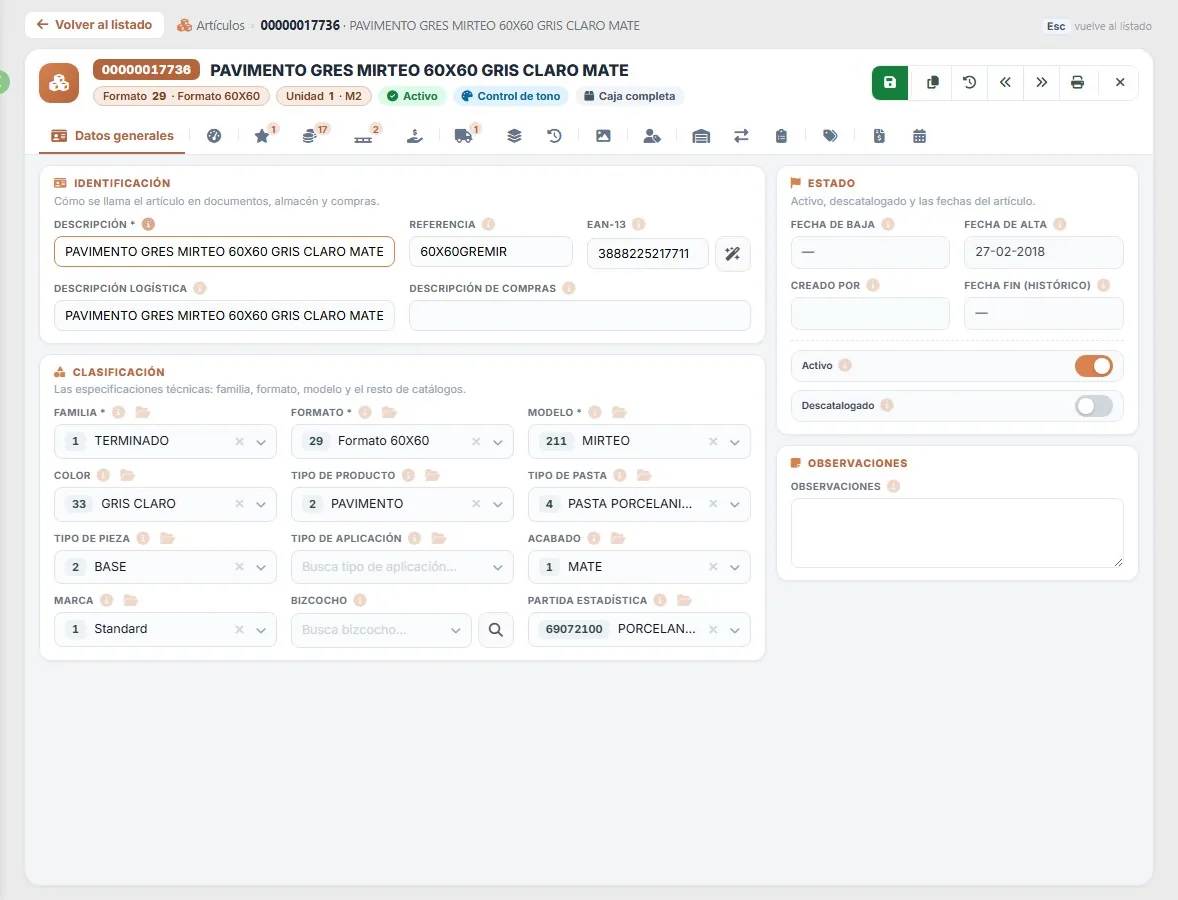
The ceramic item record
Description, size, series, colour, product and piece type, body and finish; in the header, the unit (m²) and whether the item is controlled by shade.
02
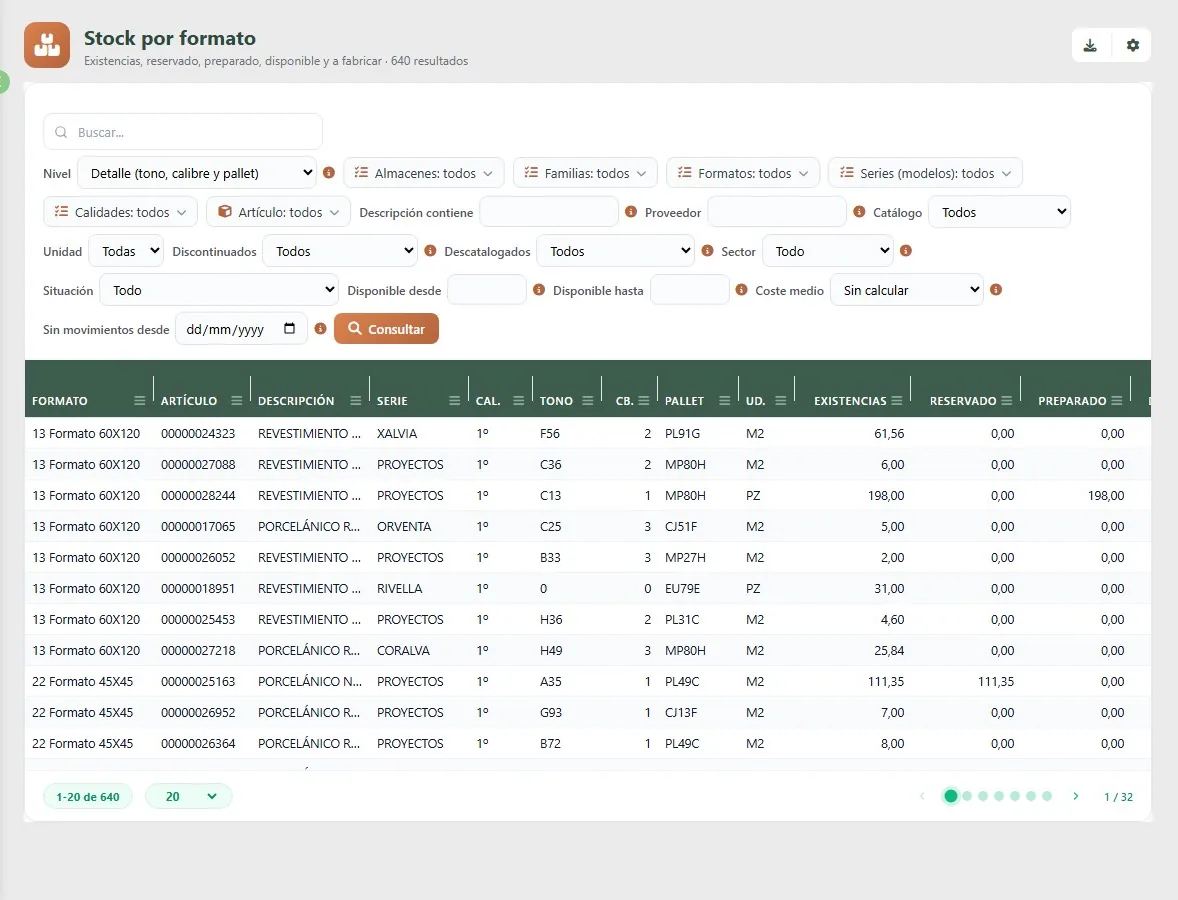
Stock by size, down to shade, calibre and pallet
Stock, reserved, prepared and available for each shade and calibre, in m² or pieces, with filters by warehouse, family, size, series and quality.
03
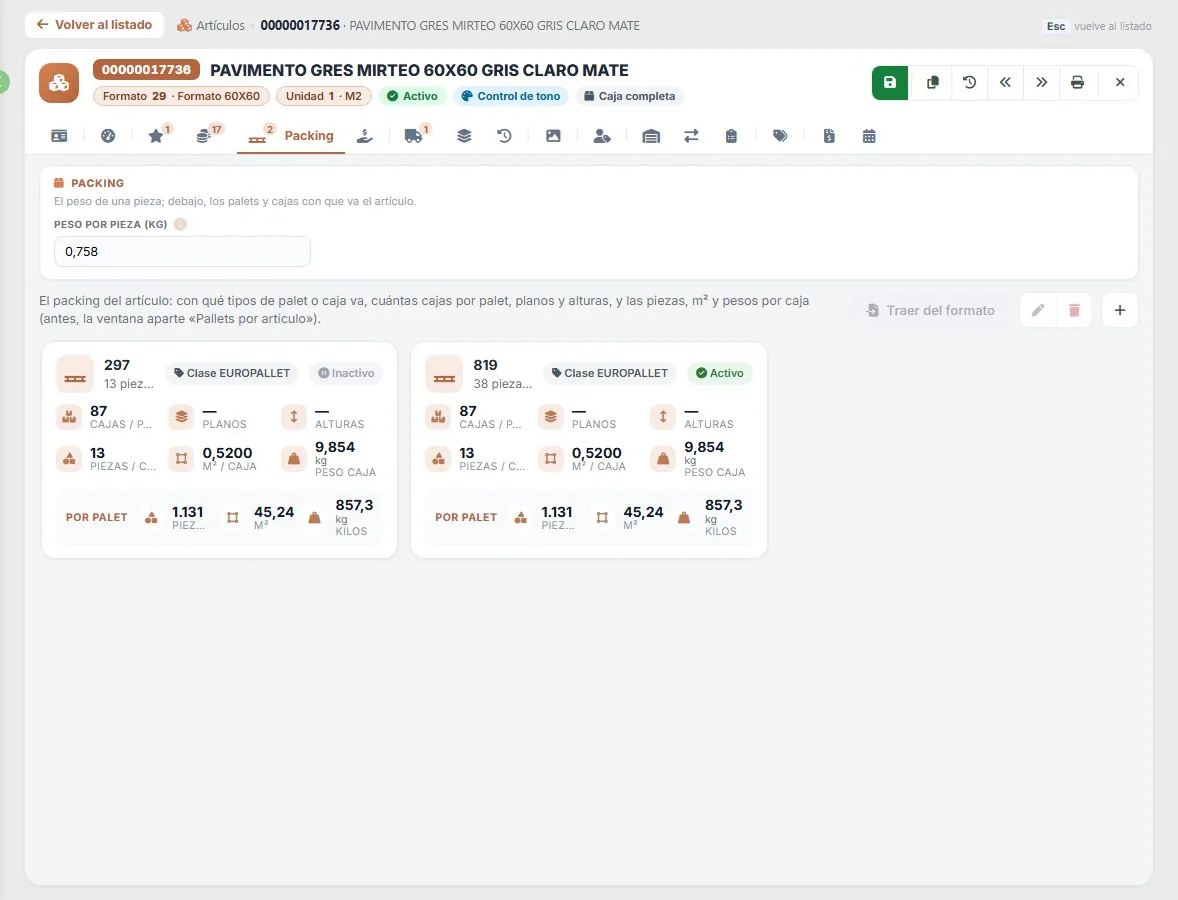
The item’s packing
Pieces and m² per box, weight, and boxes, pieces, m² and kilos per pallet for each pallet type the item ships on.
04
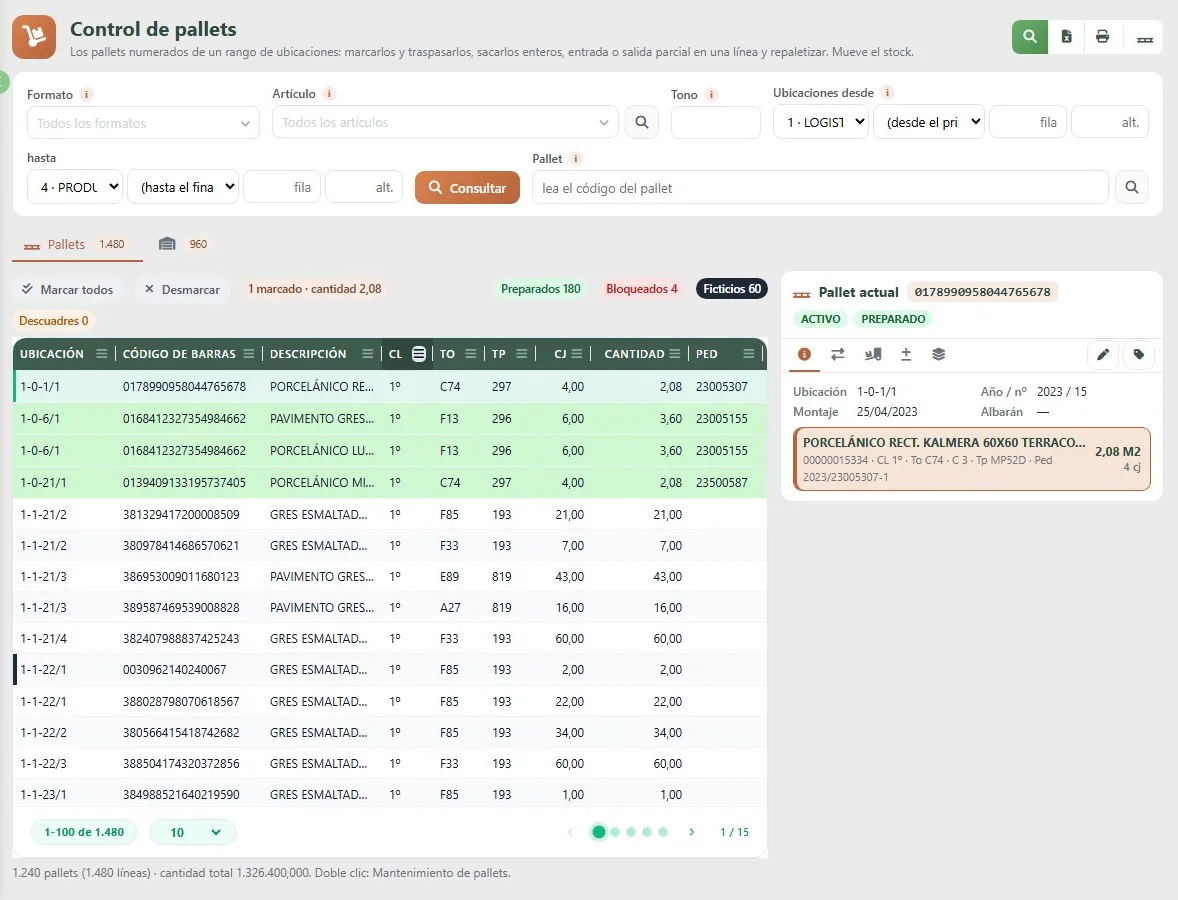
Numbered pallet control
Each pallet with its location, SSCC code, quality, shade, calibre, boxes and quantity; prepared ones in green. Select, transfer, take out whole, ship partially and repalletise.
05
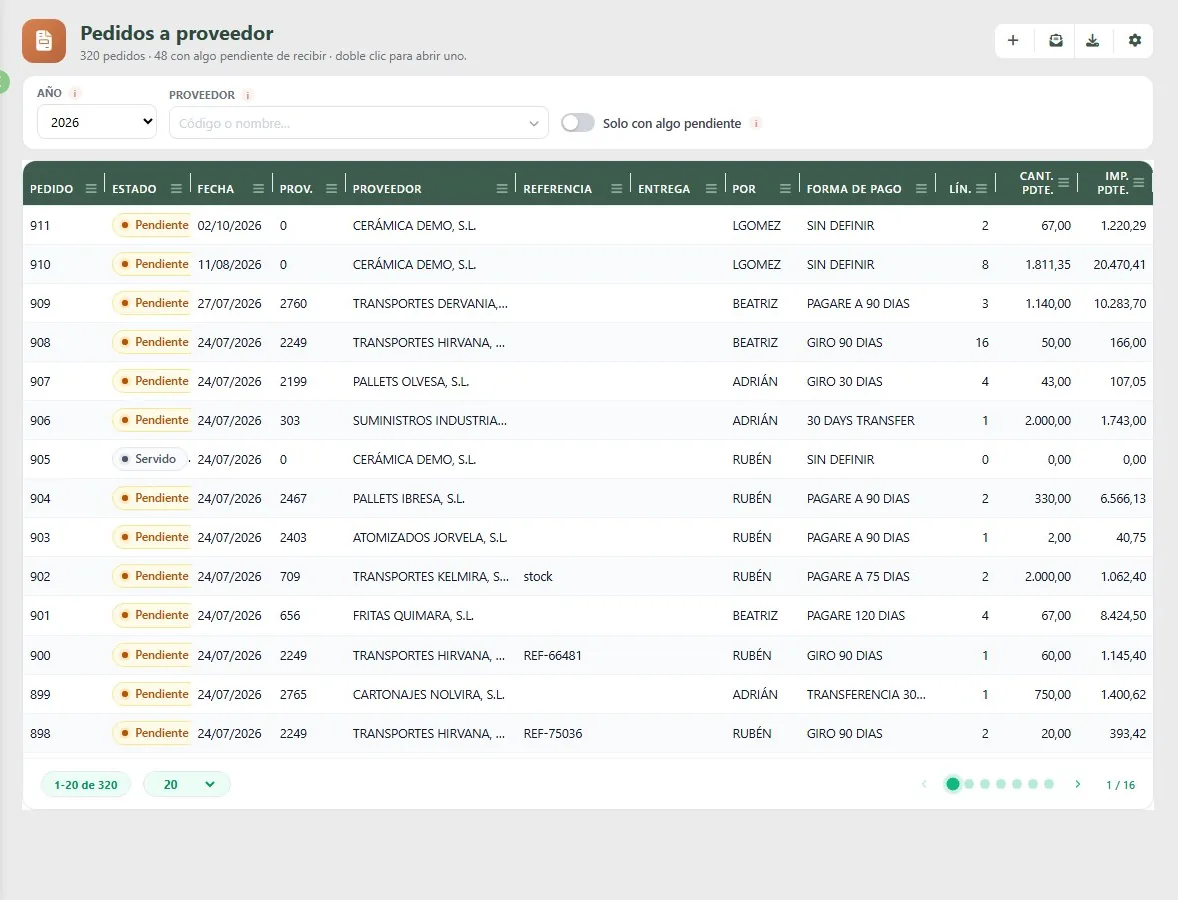
Purchase orders
Status, payment method, and quantity and amount still to be received; from here you move on to goods receipt and putaway in the warehouse.
06
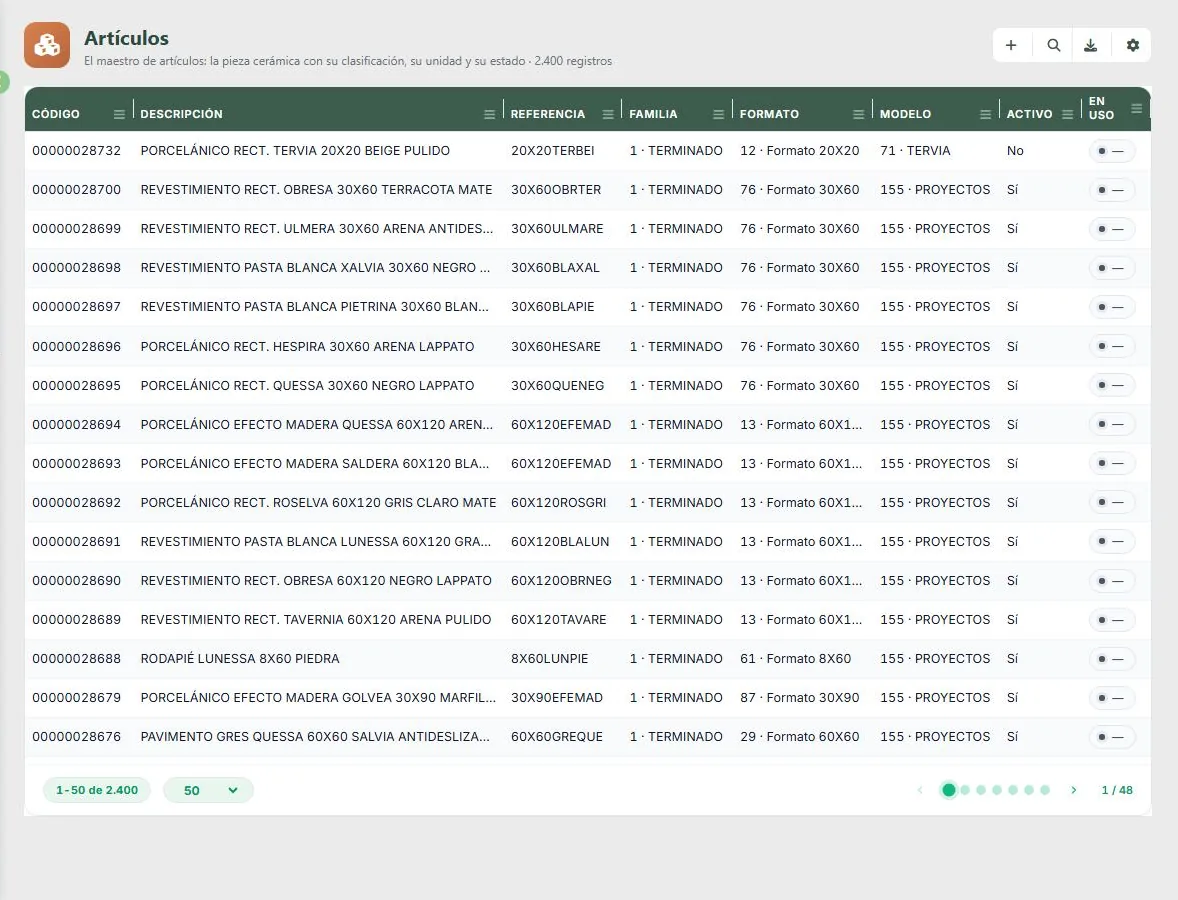
Catalogues of tens of thousands of pieces
The ceramic piece with its family, size and series; a single search box, column filters and server-side pagination.
07
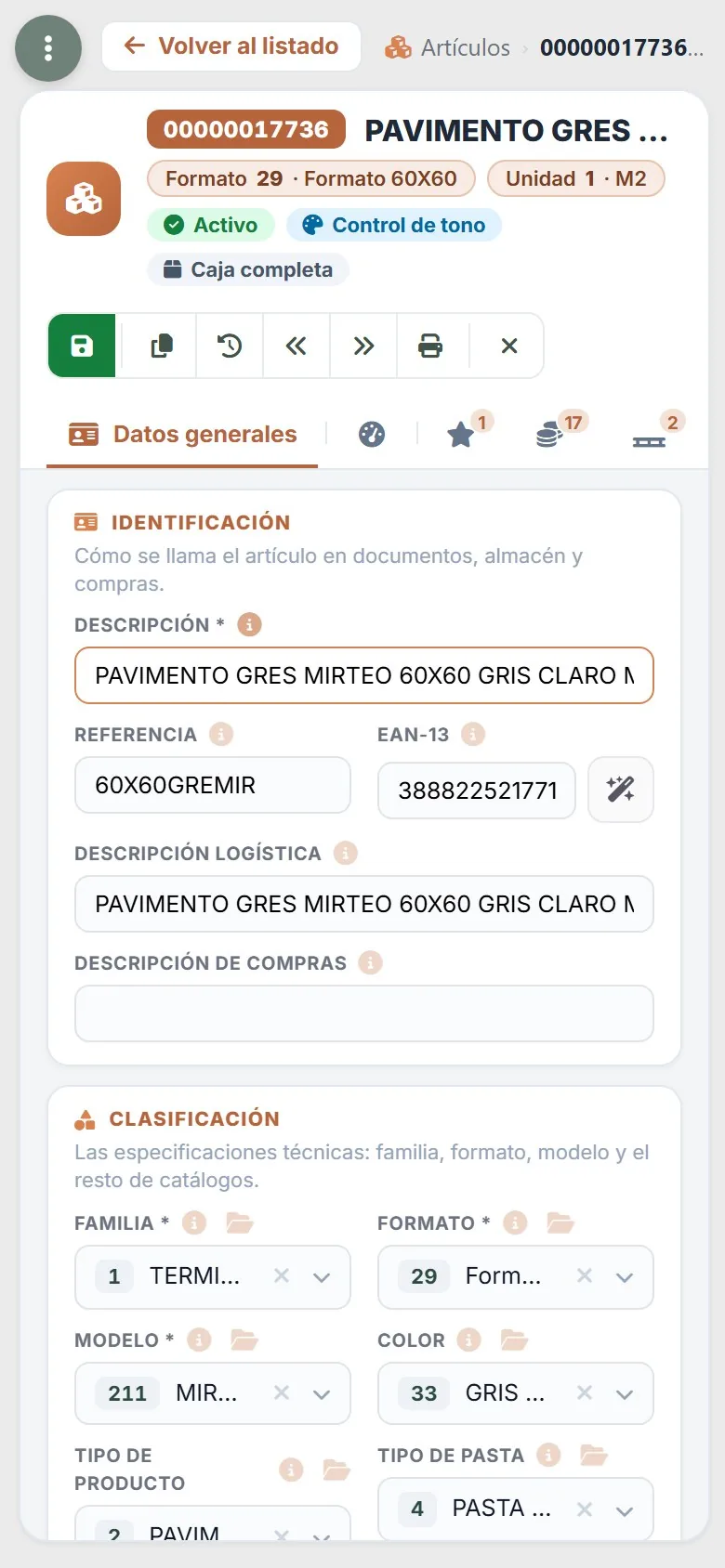
On your mobile: the item record
Its size, its unit in m² and shade control, to check it from the warehouse or during a visit.
08
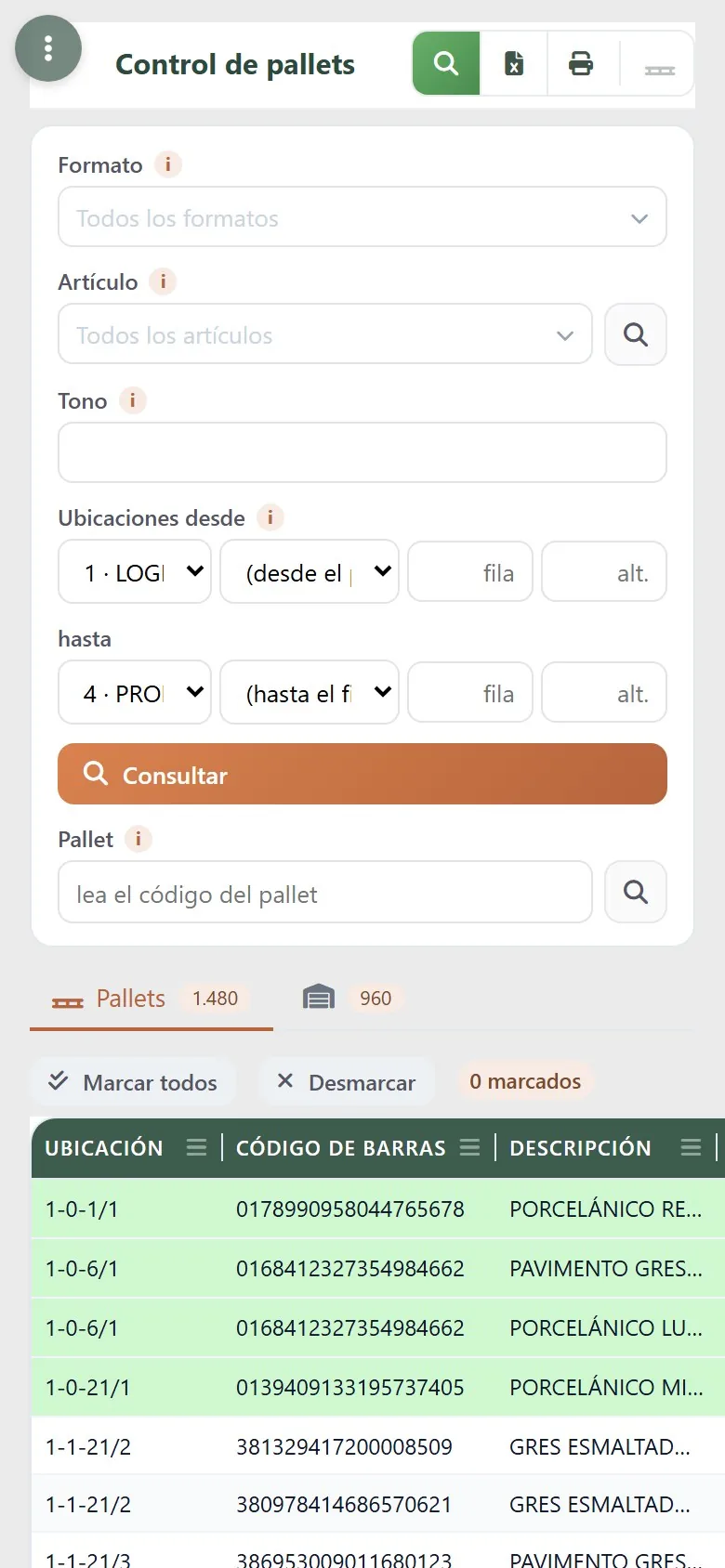
On your mobile or warehouse terminal: the pallets
Pallet control with pallet code scanning and the prepared ones in green.
Fictitious data from a demo company. Any resemblance to real companies or products is coincidental.
Specialised versus generic
Why a ceramics ERP
A generic ERP doesn’t know what a shade or a calibre is, or that a size is palletised differently depending on the supplier. JobCeram grew out of the Jobers ceramics ERP, with decades of experience in the industry.
A generic ERP
- Shade and calibre in a text field that everyone fills in their own way.
- Pallets, boxes and square metres converted by hand.
- Locations that don’t exist: the stock is just «in the warehouse».
- Purchasing with no goods receipt or putaway: the goods arrive and get recorded later.
- Purchase planning on a spreadsheet.
JobCeram
- Shade and calibre by quality, in stock and in what ships.
- The packing for each item: boxes, pieces, m² and kilos per pallet.
- A location map and labelled numbered pallets.
- Goods receipt and putaway for every purchase delivery note.
- Minimums, maximums and dynamic control that suggests what to order.
What’s available today
What’s already built and what’s coming
Already built
- Items with all their ceramic specifications: sizes, series, qualities, colours, bodies, finishes, uses, brands and pallets, with the packing for each item.
- Warehouse: goods in, goods out, transfers, stock counts by location, stock blocking, labels and bands.
- Stock by size with shade, calibre and pallet; by location and at a given date; valued, minimums and maximums, reservations and integrity checks.
- Logistics with numbered pallets (SSCC label) and their control.
- Complete purchasing: orders, delivery notes, goods receipt and putaway, invoices, purchase planning, enquiries and statistics.
- The sales catalogues: carriers, zones, agents, shipping methods, series, invoice footers and terms.
In development
- Sales: customer orders, delivery notes and invoices.
- Production and samples.
The administrative side —accounting, VAT, receivables and payables— is covered by JobFinan. In the demo we show you only what already works, and what’s coming, with its timeline.
The Jobers family
Part of a family, not a standalone program
JobCeram shares its database and users with the rest of the family: each piece does its part and data is entered only once. Each one is contracted separately.
Frequently asked questions
What people ask us most about JobCeram
What is JobCeram?
How does it handle shades and calibres?
Does it manage numbered pallets and locations?
Does it already handle customer orders and invoicing?
Does it integrate with accounting?
Does it work on mobile?
Shall we show you with your own catalogue?
A demo with a consultant who knows ceramics. No obligation.