


JobMat
Building materials
Your builders’ merchant, up to date wherever you are.
For builders’ merchants, hardware stores and suppliers: the stock of every item by warehouse, with its shade and calibre; multiple units and packing by pallet; quotes, orders and delivery notes; prices per customer; the trade counter on your mobile; and accounting in the same menu.
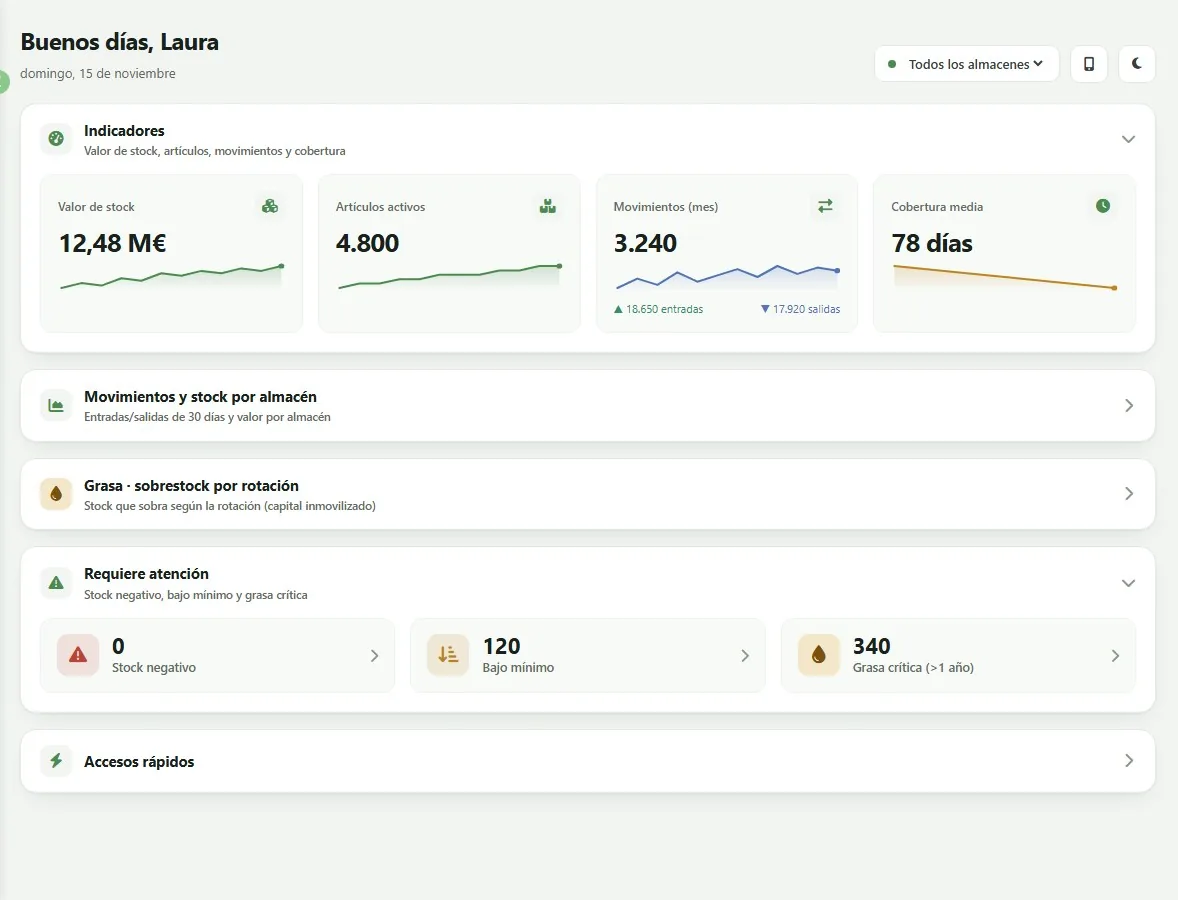
Real JobMat screen, with fictitious data from a demo company.
Who it’s for
Designed for the builders’ merchant
Thousands of items, trade customers with their own price list and credit risk, several warehouses and a trade counter that can’t wait for someone in the office to check.
Builders’ merchants
Cement, aggregates, bricks, ceramics and everything that goes out to trade customers every day, across several warehouses and locations.
Hardware and industrial supplies
Large catalogues, different sales units and customer price lists, with stock always in view.
Plumbing, electrical and paint
Very different product families in one company, each with its own suppliers, prices and turnover.
What it does
Warehouse, sales and trade counter, all in one place
What used to be spread across several programs and a spreadsheet, now in one web application you open from the office, the trade counter or your mobile.
Stock by warehouse
Physical, reserved, blocked, breakages, awaiting dispatch and awaiting receipt, broken down by shade, calibre and pallet type.
Multiple units and packing
Sales and purchase units with their conversion, m² and pieces per box, boxes per pallet and a different packing for each pallet type.
Stock enquiries
By item or by warehouse, valued, at a given date, below minimum, turnover, stock ledger and stock variation.
Movements and stocktaking
Goods in and out, transfers between warehouses, stocktaking and physical counts, and blocking of material.
Quotes with their dashboard
Quotes with PDF and email sending, and a dashboard with the funnel, conversion and overdue follow-ups.
Orders and delivery notes
Sales orders, dispatch from order to delivery note and a single enquiry screen for orders and delivery notes.
Prices and price lists
Price lists and offers, special prices per customer, discounts and a price simulator; margins and minimum price on the item record.
The trade counter on your mobile
On a mobile or a PDA: the price for a customer, stock by warehouse and labels, scanning the barcode with the camera.
Customers and accounting
Customer credit risk snapshot, sales Pareto, posting of sales invoices and JobFinan in the same menu.
Real screens
How you work with JobMat
Screenshots of JobMat with a demo company. The data (items, customers, suppliers, figures and amounts) is fictitious.
01
A home page that warns you
Stock value, active items, movements this month and coverage; and what needs attention: negative stock, below minimum and overstock by turnover.
02
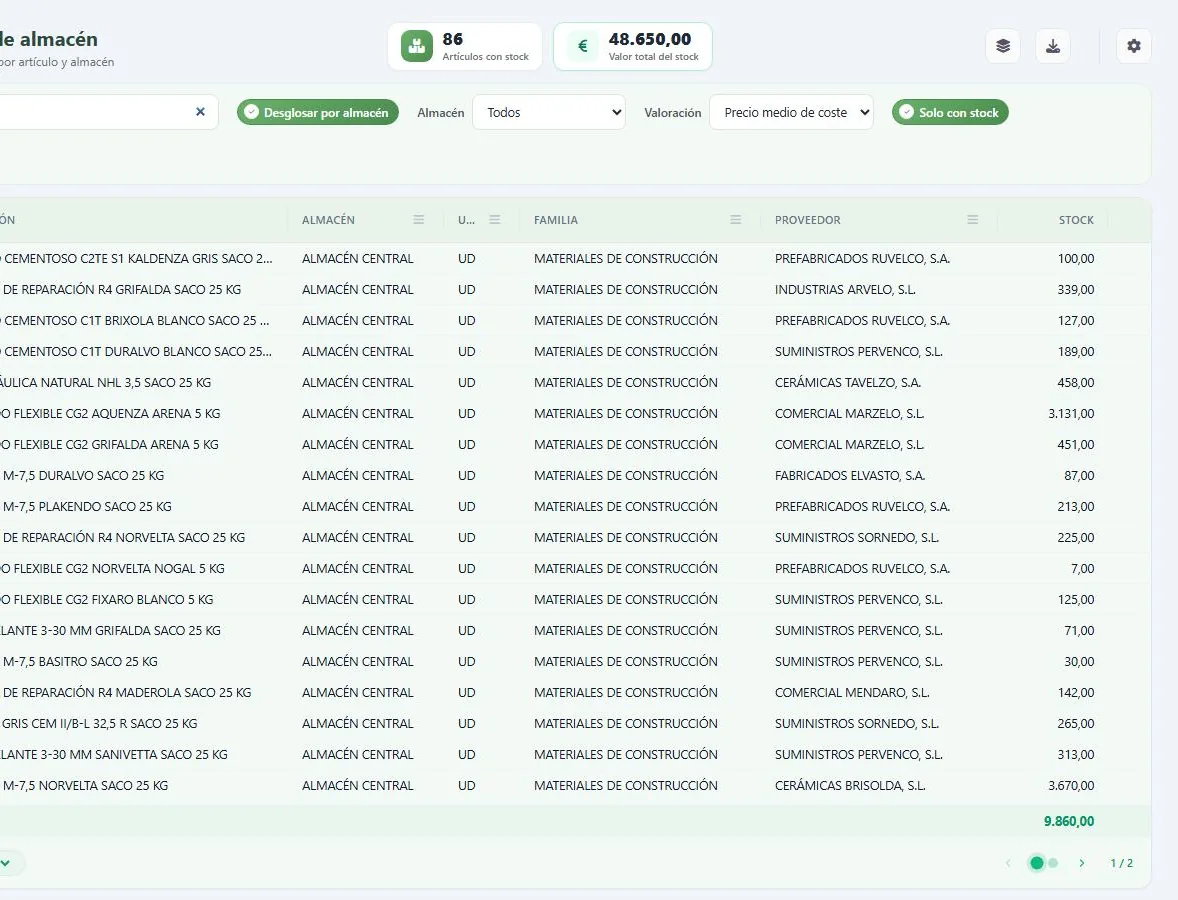
Stock by item and warehouse
Valued at average cost, with search, column filters, totals and export to Excel.
03
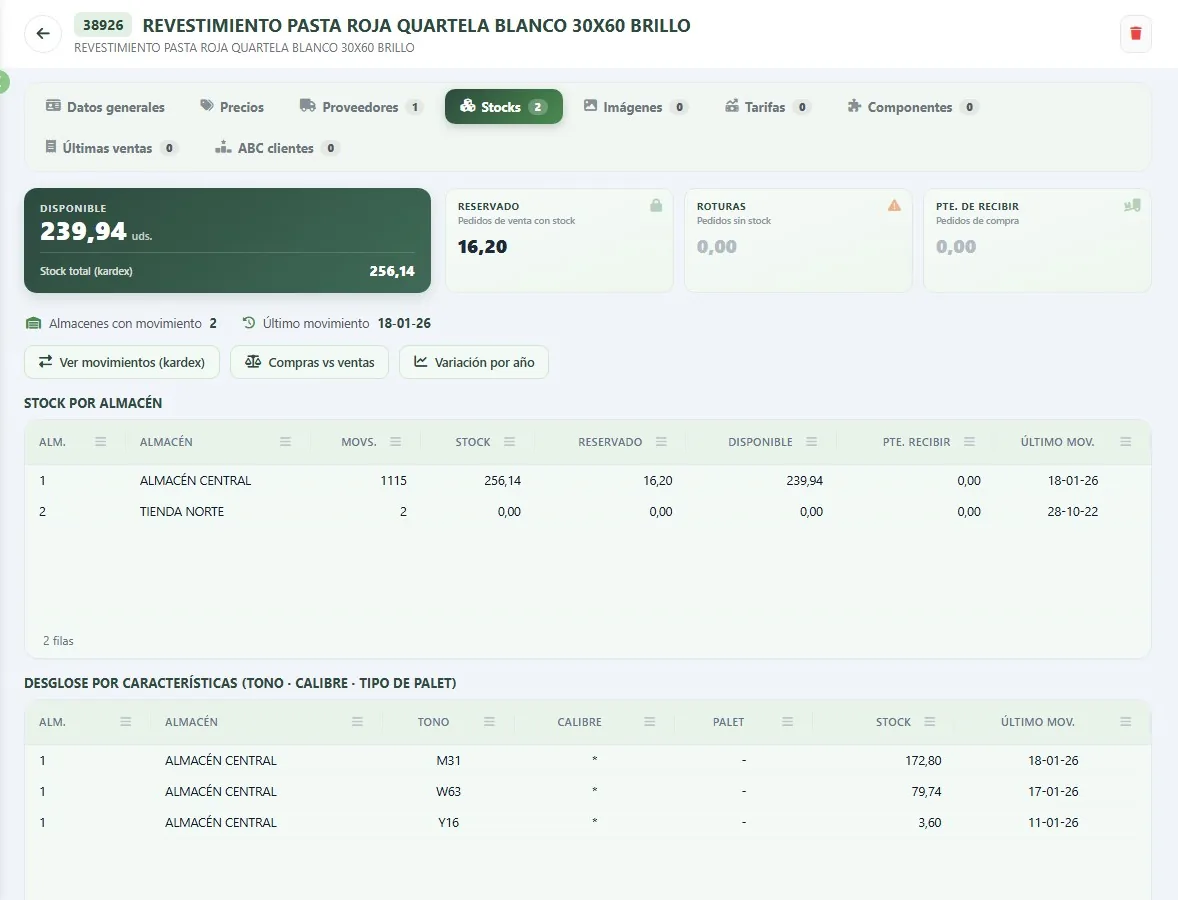
Item stock, with shade and calibre
By warehouse: physical, reserved, breakages, awaiting receipt and available; and broken down by shade, calibre and pallet type.
04
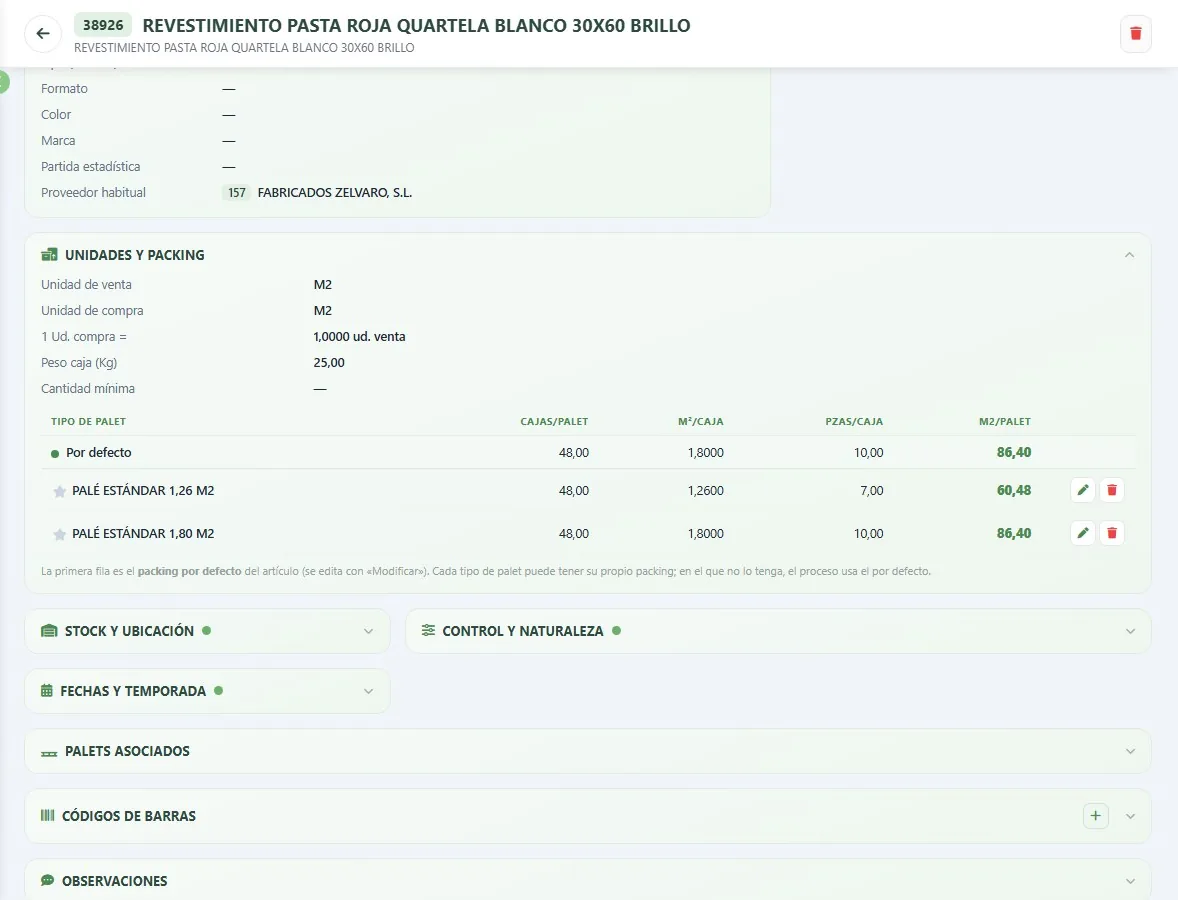
Multiple units and packing
Sales and purchase units, m² per box, pieces per box and boxes per pallet, with a different packing for each pallet type.
05
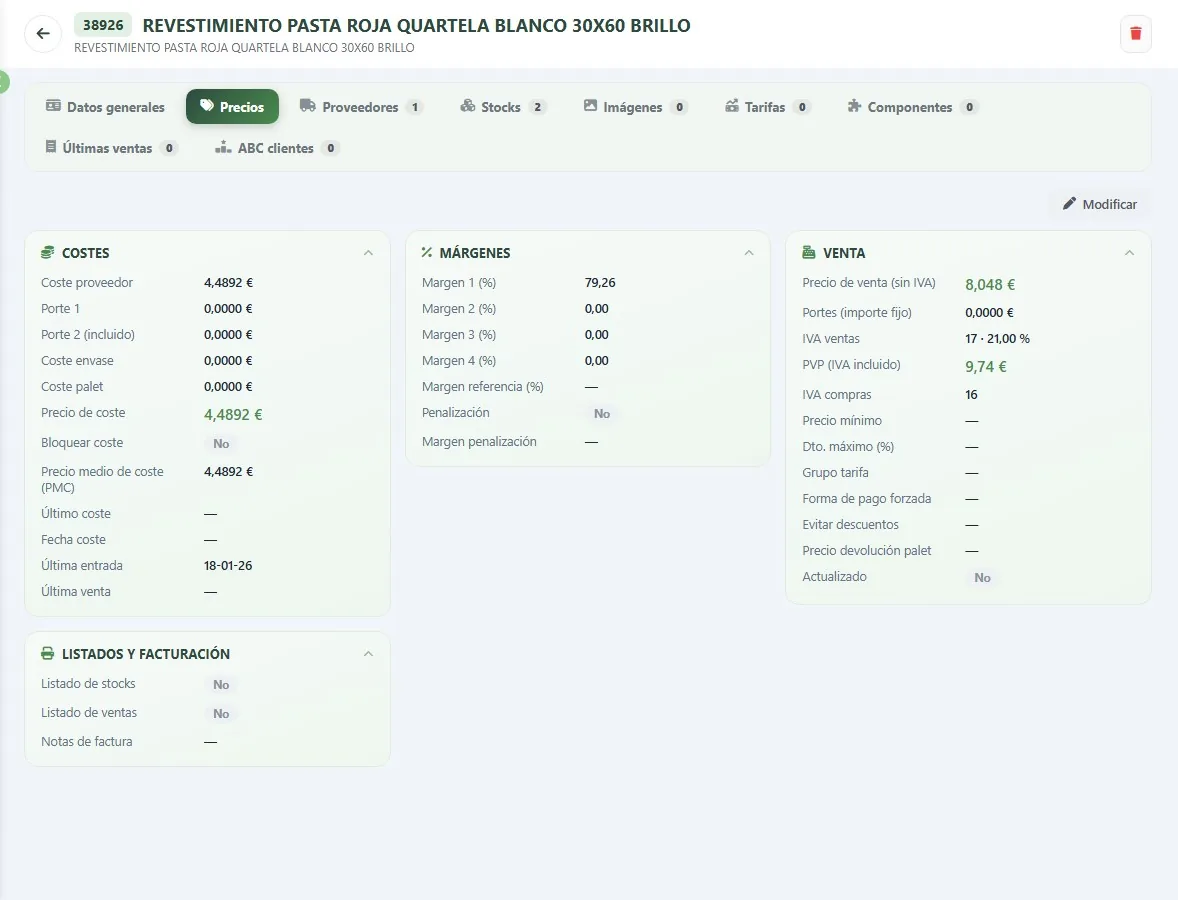
Item prices
Supplier cost with carriage, packaging and pallet, average cost, margins, retail price with VAT and minimum price.
06
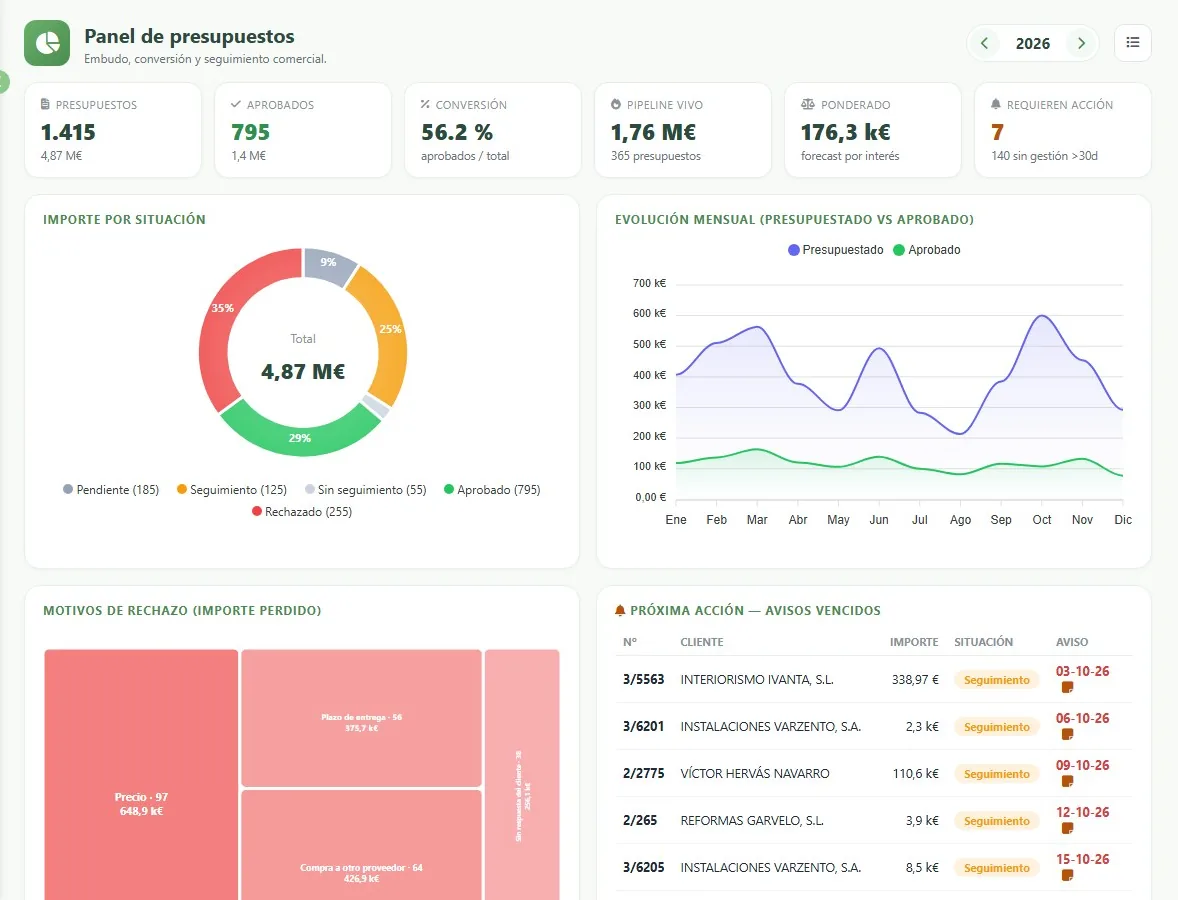
The quotes dashboard
Funnel by status, conversion, live pipeline, monthly trend, reasons for rejection and overdue follow-up alerts.
07
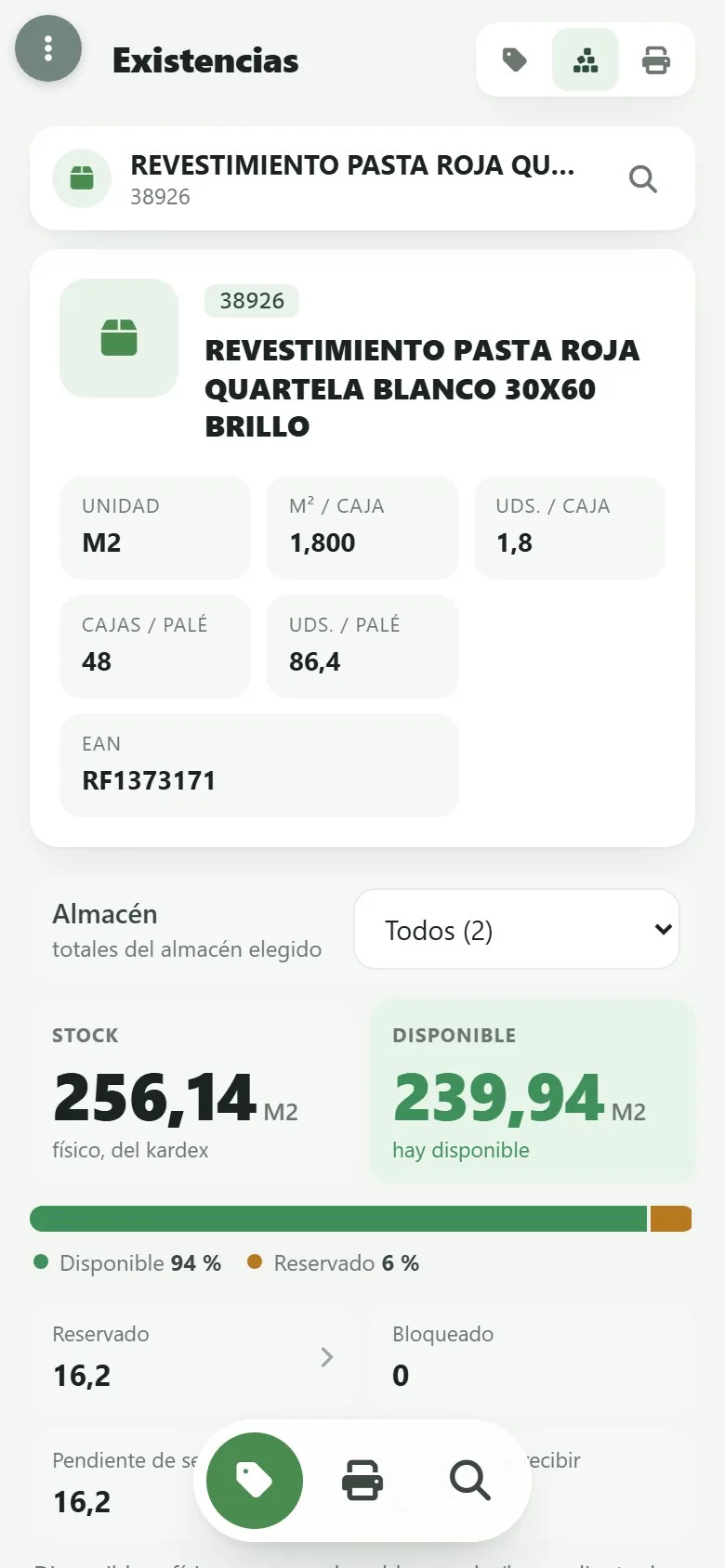
At the trade counter: stock
On a mobile or PDA, an item’s stock by warehouse, with m² per box and boxes per pallet, scanning the barcode with the camera.
08
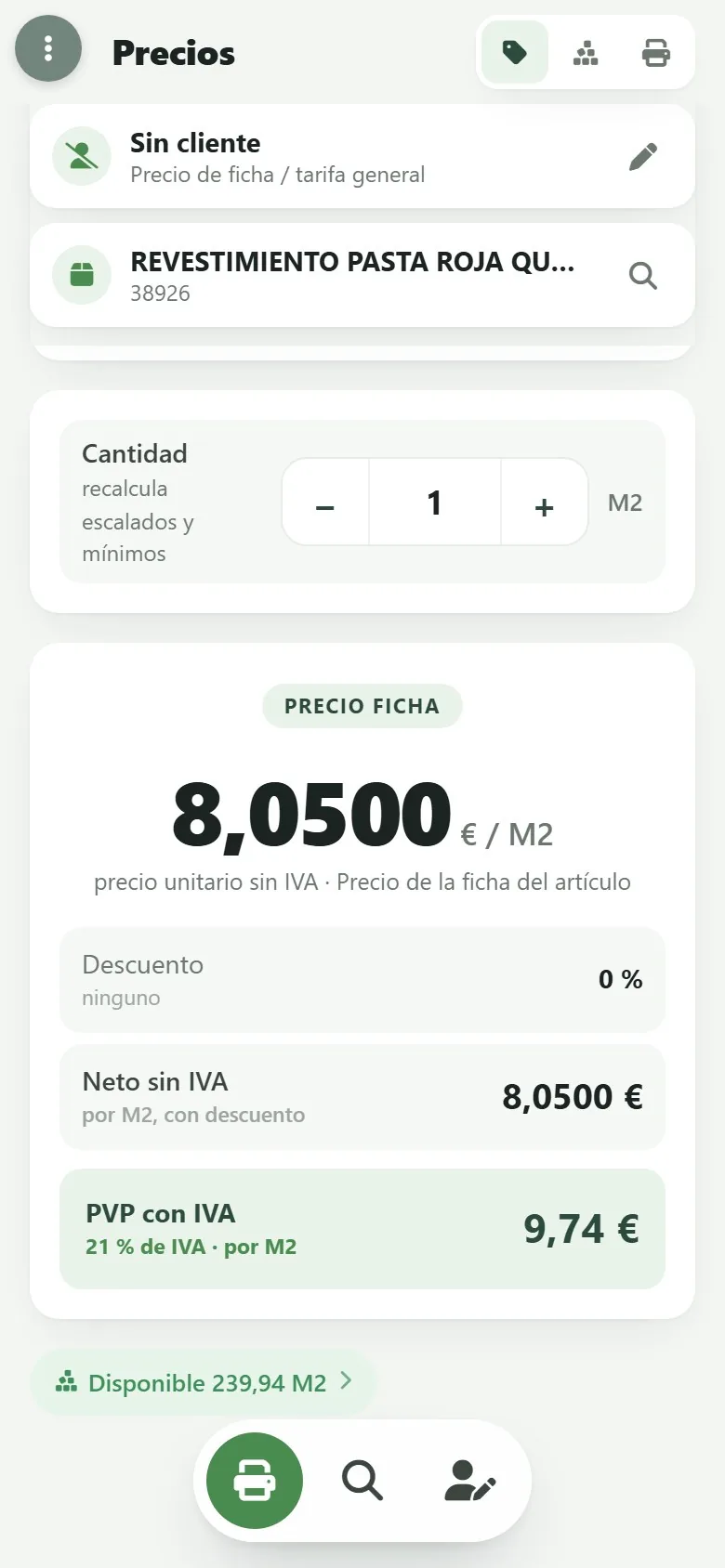
At the trade counter: the price for each customer
An item’s price for a customer or with no customer, calculated with their price list and discounts.
Fictitious data from a demo company. Any resemblance to real companies or products is coincidental.
Specialised versus generic
Why an ERP for building materials
A generic ERP doesn’t know that the same customer buys at trade price, that material leaves from two warehouses or that credit risk has to be checked before the lorry is loaded. JobMat grew out of the Jobers building materials ERP, with more than 35 years in the sector.
A generic ERP
- Stock by warehouse, only through reports that take ages to run.
- Trade price lists and discounts handled with custom developments.
- Boxes, pallets and square metres converted by hand.
- Accounting kept separate, with exports and imports.
- At the trade counter or on a customer visit, you can’t see it.
JobMat
- Stock by warehouse, with shade, calibre and pallet.
- Quotes, orders and delivery notes with the customer’s prices.
- Multiple units and packing by pallet, built in.
- The trade counter on your mobile and JobFinan in the same menu.
- On the web and on your mobile, with permissions per person.
What’s available today
What works today and what’s coming
On the web today
- Items with multiple units, packing by pallet, prices, price lists, suppliers, components and customer ABC.
- Stock by warehouse with shade, calibre and pallet; stock enquiries, stock ledger and stock variation.
- Goods in, goods out, transfers, stocktaking and blocking of material.
- Quotes with their dashboard, orders, dispatch to delivery note and delivery note enquiries.
- Price lists, offers, special prices, credit risk snapshot, agents and sales Pareto.
- Receipt of material invoices and posting of sales invoices, with JobFinan built in.
- The trade counter on a mobile or PDA.
In development
- Web point-of-sale (POS) terminal for the shop.
- Order picking by location in the warehouse.
- Payments on account linked to the order.
In the demo we only show you what already works, and what’s coming, with its timeline.
The Jobers family
Part of a family, not a standalone program
JobMat shares its database and users with the rest of the family: each piece does its part and the data is entered only once. Each one is contracted separately.
Frequently asked questions
What people ask us most about JobMat
What is JobMat?
Does it work with several warehouses?
Is it suitable for the trade counter?
Does it integrate with accounting?
Does it work on mobile?
What happens to my current data?
Shall we show you with your own items?
A demo with a consultant who knows the builders’ merchant business. No obligation.