


JobMed
Medical device distribution
Batches, expiry dates and suppliers under control.
For distributors of medical and surgical supplies, electromedical equipment, laboratory and diagnostics: every item with its stock by warehouse, batch, expiry date and serial number; every supplier with its approval status and certificates monitored; every price with its reason.
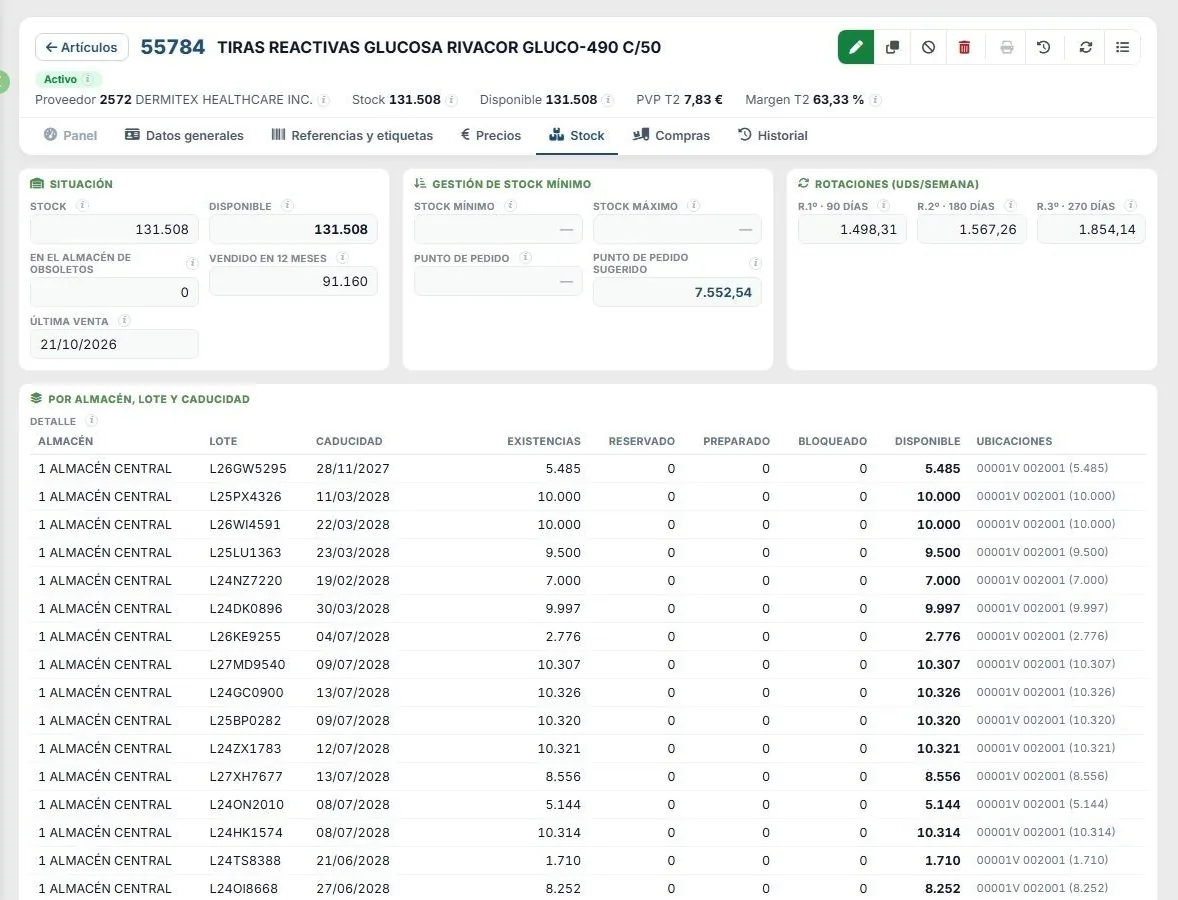
Real screen from the demo installation, with fictitious data.
Who it’s for
Designed for medical device distributors
Thousands of items with batch and expiry date, equipment with serial numbers, suppliers that need approving and customers who won’t accept a single mistake.
Medical and surgical
Instruments, implants and disposables for operating theatres and hospitals, with strict batch and expiry control.
Electromedical equipment
Serial-numbered equipment from several represented brands, with prices that vary by supplier and currency.
Laboratory and diagnostics
Short-dated reagents and consumables, where the batch and the date decide what ships first.
What it does
Every unit, with its batch, its date and its supplier
Hospitals, clinics and laboratories buy from a distributor who must answer for every unit supplied: which batch it comes from, when it expires, what serial number it carries and whether its supplier was approved.
Complete item record
Stock, available quantity, retail price and margin always in view; and in tabs, the details, references and packaging, prices, stock, purchases and history.
Batch, expiry date and serial number
Stock by warehouse, batch and expiry date, with what is reserved, prepared and blocked in each batch, its location and an alert for anything expiring soon. Equipment, unit by unit.
Approved suppliers
Approval status, ISO 13485, ISO 9001 or MDR certificates with their expiry date, and incidents. The home screen warns you when a certificate has expired or is about to.
Agreed prices
Every price with its end date, the latest actual purchase from that supplier and the deviation from what was agreed, so you can negotiate with data.
Margins calculated properly
Cost in the supplier’s currency, converted to euros and including carriage; price lists with their profit and margin, VAT and equivalence surcharge, and an alert if the latest purchase strays from the cost.
Stock and month-end close
The value of the warehouse, the real result for the month, coverage in months and the journal entry for the change in stock, with a preview.
GS1 barcodes in the warehouse · in development
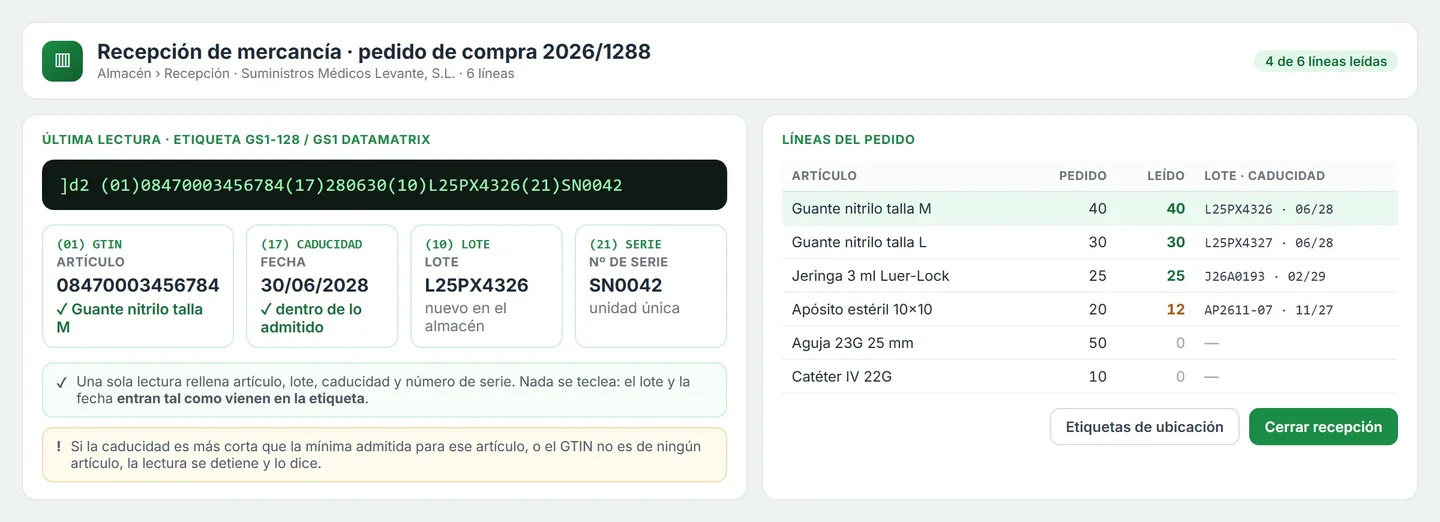
One scan of a GS1-128 or DataMatrix label gives product, batch, expiry date and serial number: goods in, picking and stocktaking without typing.
Tenders · in development
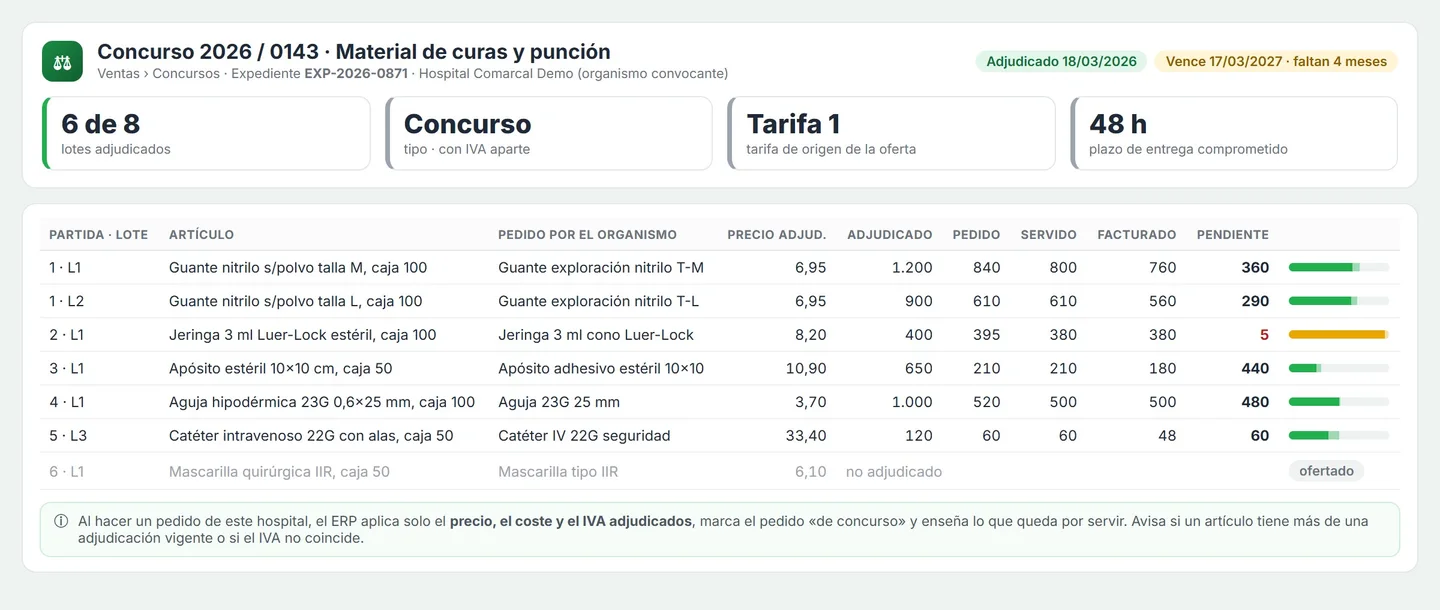
Each tender with its file number, contracting body, items and lots; the awarded price is applied automatically on orders, and awarded quantities are tracked against what has been delivered.
Supplier price updates · in development
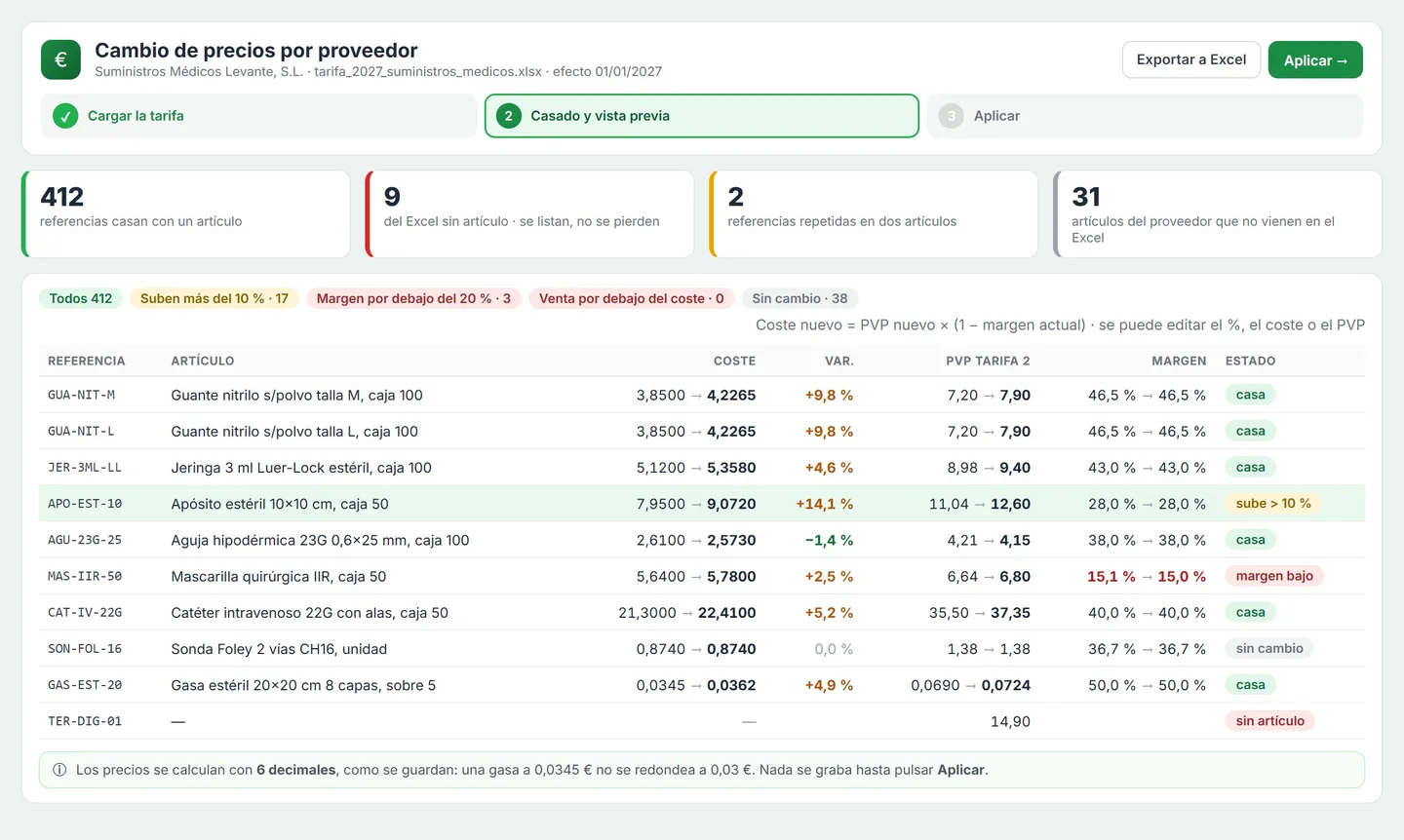
The supplier’s price list in Excel: matched by their reference, it calculates cost and selling prices, with a margin preview and an effective date.
Screens and mock-ups
How you work with JobMed
Screenshots from the demo installation and, marked as mock-ups, what is in development. The data (items, suppliers, batches and amounts) is fictitious.
01
Stock by warehouse, batch and expiry date
Each batch with its stock, what is reserved, prepared and blocked, the real available quantity and its location. Alongside, the suggested reorder point based on the sales rate and the supplier’s lead time.
02
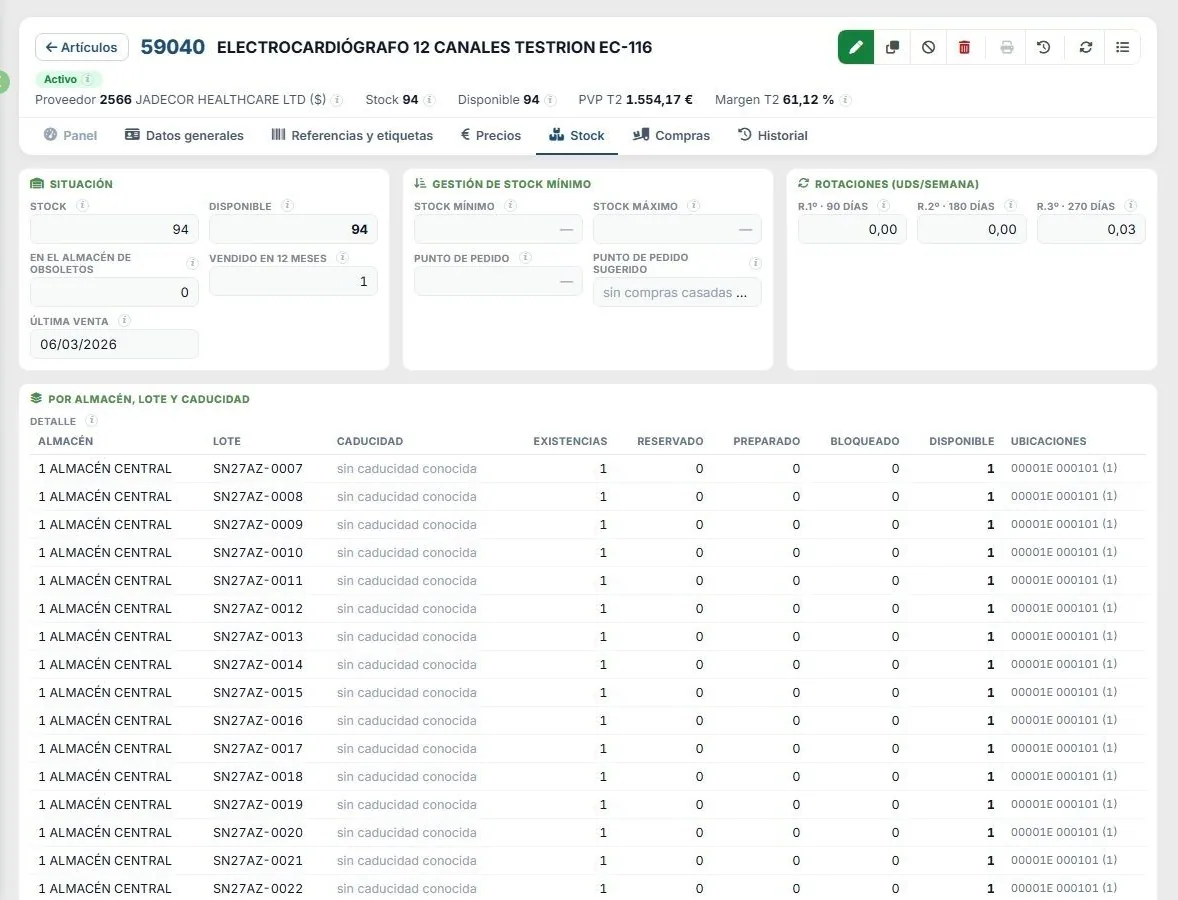
Serial-numbered equipment
With electromedical equipment every device is unique: each unit is tracked with its serial number and stock is shown unit by unit, with where it sits in the warehouse.
03
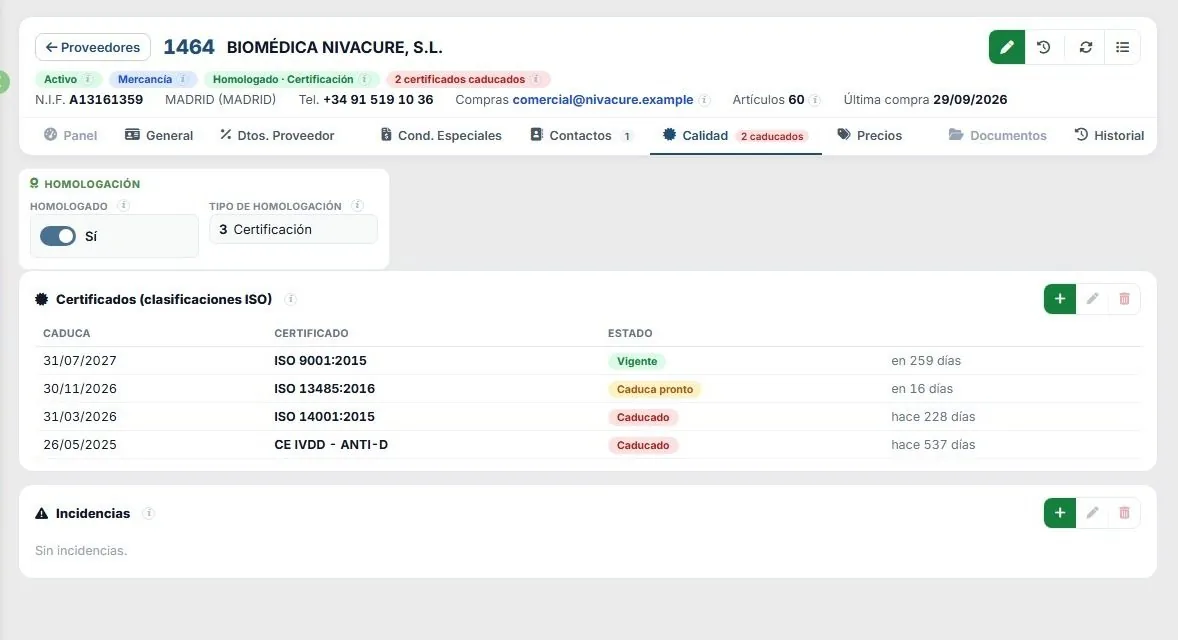
Supplier quality
Approval status, certificates with their expiry date and status (valid, expiring soon, expired) and incidents. The red pill in the header tells you there are expired certificates.
04
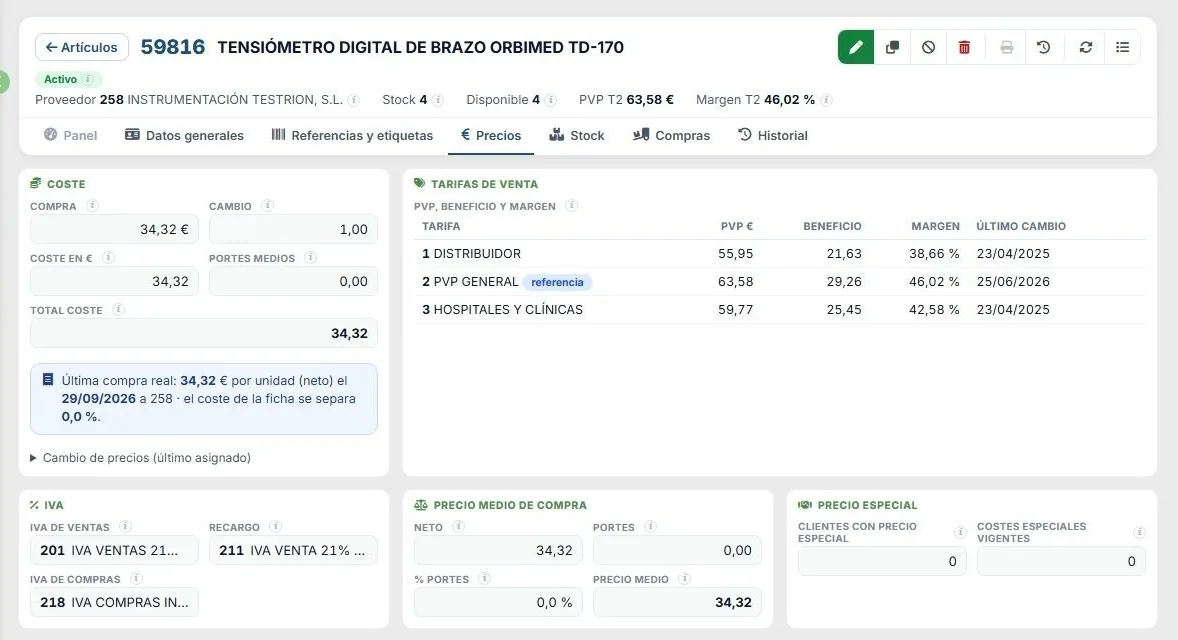
Item prices and margin
From cost in foreign currency to euros and carriage, and from there to each price list with its profit and margin; VAT, equivalence surcharge and average purchase price, with an alert if the latest purchase deviates.
05
Agreed prices by supplier
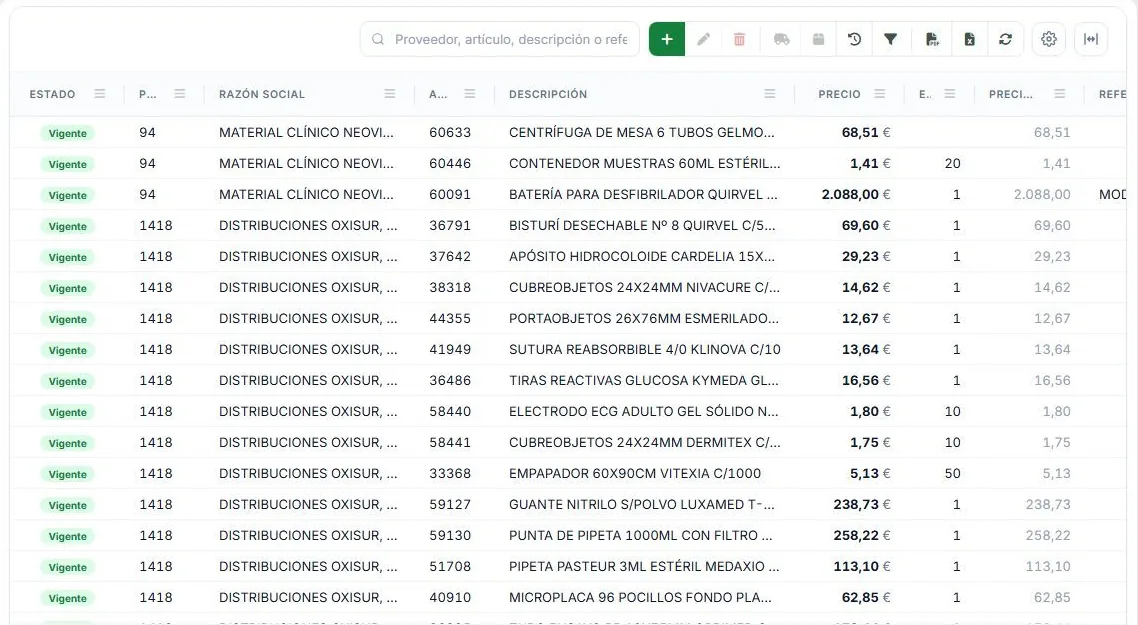
Current, expired and about to expire, with the latest actual purchase and the deviation from what was agreed: if you pay more than you agreed, you can see it.
06
Change in stock
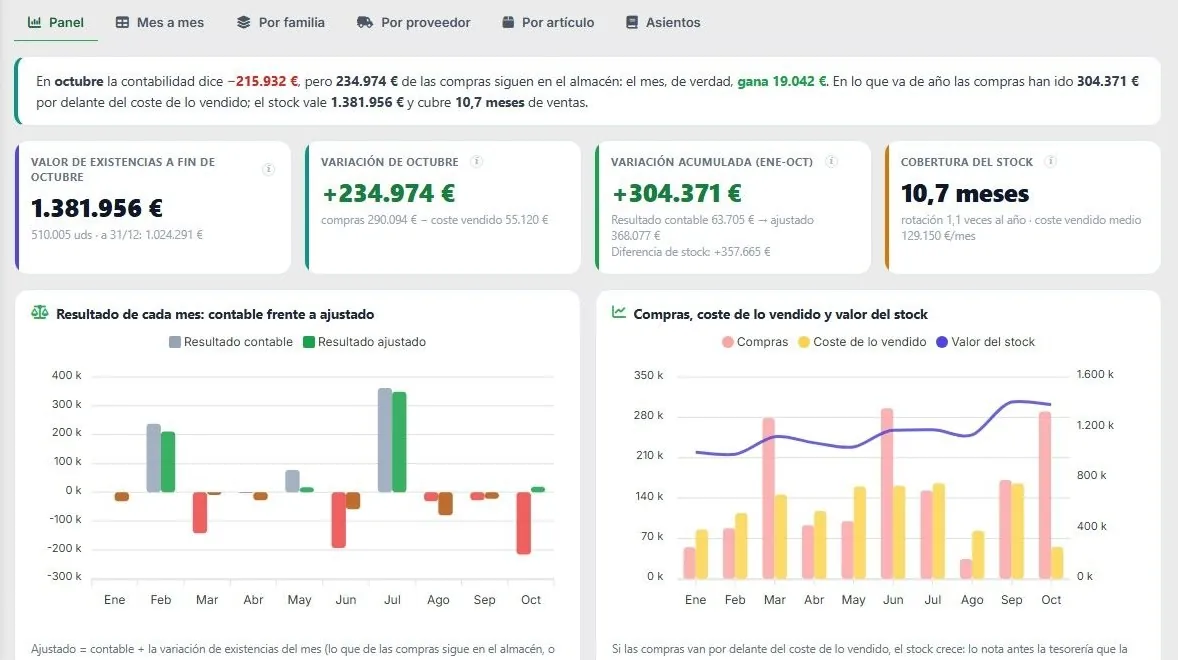
Have I really made or lost money this month, and how much is sitting idle in the warehouse? The stock value, the adjusted result, coverage and month-by-month charts.
07
Mock-up · goods in with GS1 scanning
In development. One scan fills in item, batch, expiry date and serial number, and warns if the shelf life is shorter than allowed.
08
Mock-up · an awarded tender
In development. By item and lot, the awarded price and the quantities awarded, ordered, delivered, invoiced and outstanding.
09
Mock-up · supplier price update
In development. From the supplier’s Excel to your costs and price lists: what matches and what doesn’t, cost and price before and after, and the margin.
Fictitious data from a demo company. Any resemblance to real companies or products is coincidental.
Specialised versus generic
Why an ERP for the healthcare sector
It isn’t a generic ERP with a healthcare module bolted on: it grew out of more than two decades of work with distributors in the sector, and its calculations —available stock, average price, margins, warehouse value— are checked figure by figure.
A generic ERP
- Batch and expiry date as just another field you have to remember to fill in.
- Equipment serial numbers kept in a separate spreadsheet.
- Supplier certificates in a folder nobody looks at until the audit.
- Agreed prices buried in email; the deviation turns up when you pay.
- The supplier’s new price list, checked by hand item by item.
JobMed
- Stock by warehouse, batch and expiry date, with an alert for anything expiring soon.
- Every piece of equipment, with its serial number and location.
- ISO 13485 and MDR certificates with their expiry date, and an alert on the home screen.
- Agreed prices with end dates and deviation from the latest purchase.
- The supplier’s price list, from Excel to your costs and price lists (in development).
What’s available today
What works today and what’s coming
On the web today
- Items: catalogue, record, creation, editing, composition and kits.
- Stock by warehouse, batch, expiry date and serial number.
- Suppliers: record, contacts, quality and certificates, incidents and discounts.
- Prices by supplier, with end dates and deviations.
- Change in stock and its journal entry.
- Catalogues, settings and data integrity.
- Validated barcodes, supplier reference and packaging.
In development
- Full sales and purchasing management: customers, sales, purchases and invoicing.
- The item dashboard with its ABC classification.
- Supplier price updates from their Excel price list.
- Tenders: bids, awards and tracking of deliveries.
- GS1 scanning for goods in, picking and stocktaking.
- Full traceability of every batch, from purchase to customer.
In the demo we show you only what already works, and what’s coming, with its timeline.
The Jobers family
Part of a family, not a standalone program
JobMed shares its database and users with the rest of the family: each piece does its part and data is entered only once. Each one is contracted separately.
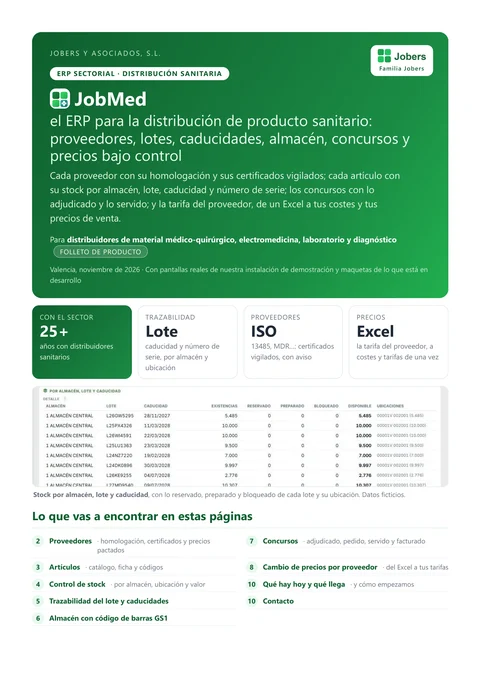
Product brochure
All of JobMed in one PDF
Suppliers, items, stock control, batch and expiry date, GS1 barcodes in the warehouse, tenders and supplier price updates: what’s available today and what’s coming.
Download the brochurePDF · 10 pages · in Spanish
Frequently asked questions
What people ask us most about JobMed
What is JobMed?
How does it handle batches, expiry dates and serial numbers?
Does it monitor supplier certificates?
Does it also handle invoicing and customer orders?
Does it handle tenders?
Can I load a supplier’s price list from Excel?
Does it integrate with accounting?
What happens to my current data?
Shall we show you with your own items?
A demo with a consultant who knows the healthcare sector. No obligation.